


Very persistant Add-On without a name
Hi FF-Community,
since a few days, I have a big problem with an Add-On in my Firefox-Installation:
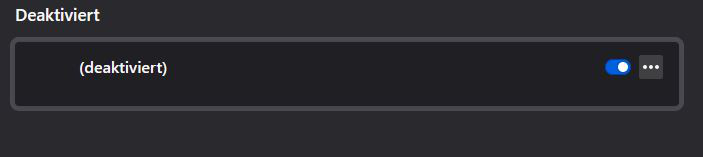
As you can see in the picture, there is an Add-On wich adds Add to my Google search for example. The Add-On has no name and I can't deinstall it, it has no Add-On folder (like it is described for manually deinstallation for Add-Ons) and I can't deactivate it.
What I've done till now:
- tried to deinstall the Add-On via Firefox GUI - tried to deinstall it via deleting the Add-On folder in Profiles/XXX/extensions - deinstalled Firefox without synchronising Add-Ons, reinstalled it - searched with my anti-virus for Firefox-Spam
Nothing worked till now...I'm about to switch to Chrome because of this f** Add-On....
Thank you for your Help, Greetings....

所有回复 (4)

Start Firefox in Safe Mode {web link}
A small dialog should appear. Click Start In Safe Mode (not Refresh).
Type about:addons<enter> in the address bar to open your Add-ons Manager. Hot key; (<Control> [Mac=<Command>] <Shift> A)
In the Add-ons Manager, on the left, select Extensions. Remove “ Google “ Anything.
Also remove SafeSearch, SearchAssist Incognito, FileConverter Addon, SearchLock, DiscreteSearch, WebSearch, Findwide Search Engine, securedsearch
Now do the same in the computer’s Programs Folder.
Windows: Start > Control Panel > Uninstall Programs. Mac: Open the Applications folder. Linux: Check your user manual.
Is the problem still there?
Hi Fred,
I did anything, now I have a completly clean Firefox without any Add-On except the one I wrote about.
By the way, also in the Safe-Mode I can't deinstall the Add-On.
You may have ad/mal-ware. Further information can be found in this article; https://support.mozilla.org/en-US/kb/troubleshoot-firefox-issues-caused-malware?cache=no
Run most or all of the listed free to use malware scanners. Each works differently. If one program misses something, another may pick it up.
You can check the extensions.json file in the profile folder with this tool to see if that shows information about this extension.
You can use the button on the "Help -> Troubleshooting Information" (about:support) page to go to the current Firefox profile folder or use the about:profiles page.
- Help -> Troubleshooting Information -> Profile Folder/Directory:
Windows: Open Folder; Linux: Open Directory; Mac: Show in Finder - https://support.mozilla.org/en-US/kb/profiles-where-firefox-stores-user-data