


How do I sync PC bookmarks to iCloud?

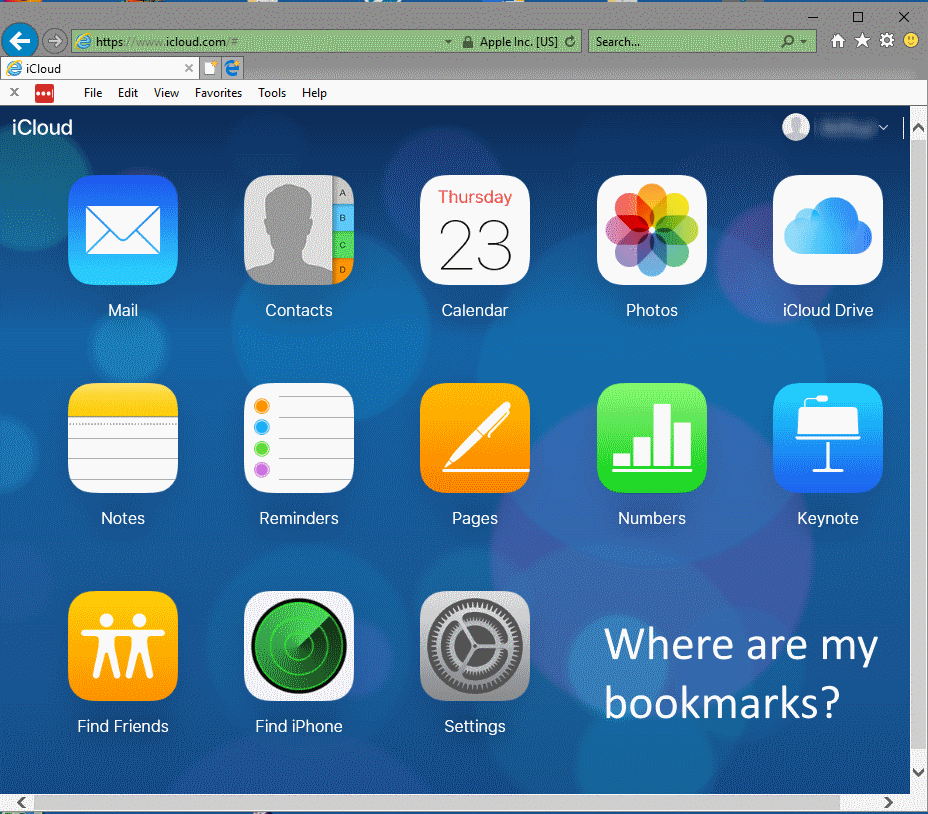
I want to sync my Windows Firefox 57.0 bookmarks in iCloud. I've installed iCloud for Windows and checked to sync bookmarks in Firefox. I've installed the iCloud Bookmarks app. The app reports that my bookmarks are synced in iCloud, but when I go into iCloud .com, I see nothing that shows my bookmarks. Is the app working correctly? Did I sync this incorrrectly? Thanks.
所有回复 (3)
Sorry Mozilla Fireox does not do support for Apple. They have their own support site you can talk to since it is that service that is your problem.
You can do this and just back them up, put on usb, email to your self.... https://support.mozilla.org/en-US/kb/export-firefox-bookmarks-to-backup-or-transfer and https://support.mozilla.org/en-US/kb/import-bookmarks-html-file
Please let us know if this solved your issue or if need further assistance.
Is there another way to sync my PC Firefox 57.0 bookmarks in iCloud?
Ok but just to let you know it is more secure to back up your own and email it to yourself. as per "The extension stopped working. Now my bookmarks are out of sync between Firefox on Windows and my Apple devices. When it comes time for bookmark cleanup, I have to do it twice. This is a real bummer!"
No idea, do not own a Iphone but maybe this is the info looking for.
Would be sync between desktop and Firefox for Iphone only I am thinking.
https://support.mozilla.org/en-US/kb/sync-firefox-bookmarks-and-browsing-history-iOS
Would need to read info form the Extension or the support page : https://addons.mozilla.org/en-US/firefox/addon/icloud-bookmarks/
No idea as page is 4 yrs old https://www.howtogeek.com/175294/how-to-sync-any-browsers-bookmarks-with-your-ipad-or-iphone/
Please let us know if this solved your issue or if need further assistance.