


Windows 10 reached EOS (end of support) on October 14, 2025. If you are on Windows 10, see this article.

Search Support

Avoid support scams. We will never ask you to call or text a phone number or share personal information. Please report suspicious activity using the “Report Abuse” option.

Learn More
Open

VPN whitelist & blacklist

Gavrilo

Hello

I just activated the Mozilla built-in VPN (beta).

I wanted to ask about the whitelist and blacklist features.

I can see currently, that there is an option to add specific websites in the VPN settings, and that the tooltip says "Use VPN for all websites except the ones on the list", acting as sort of a whitelist for the VPN features.

However, I am wondering if there is an option for a blacklist, where i would like to keep VPN off by default for all websites, except the ones on the blacklist.

For a simple example: wowhead.com is blocked in my country of origin, so I would love if i can turn on the VPN for ONLY that website - and keep the rest of my traffic on other websites without the vpn.
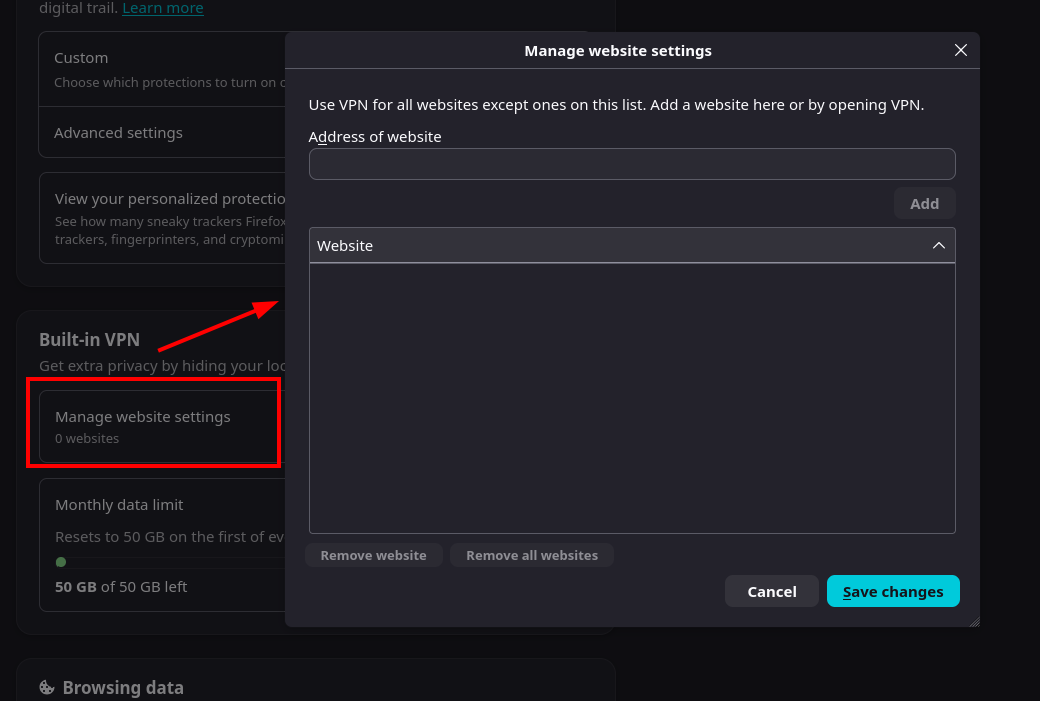
Hello I just activated the Mozilla built-in VPN (beta). I wanted to ask about the whitelist and blacklist features. I can see currently, that there is an option to add specific websites in the VPN settings, and that the tooltip says "Use VPN for all websites except the ones on the list", acting as sort of a whitelist for the VPN features. However, I am wondering if there is an option for a blacklist, where i would like to keep VPN off by default for all websites, except the ones on the blacklist. For a simple example: wowhead.com is blocked in my country of origin, so I would love if i can turn on the VPN for ONLY that website - and keep the rest of my traffic on other websites without the vpn.
Ìsopọ̀ yíyà aṣàfihàn

All Replies (1)

This is already possible, however we don't have any UI for that at the moment. But that is on the roadmap.

In about:config you can set browser.ipProtection.mode to 3 - which turns on the whitelist mode.

The list is managed currently by the browser.ipProtection.inclusion.match_patterns list, see https://developer.mozilla.org/en-US/docs/Mozilla/Add-ons/WebExtensions/Match_patterns - on how to write one for your specific needs.

Béèrè ìbéèrè

You must log in to your account to reply to posts. Please start a new question, if you do not have an account yet.