


Moving Local Folders from one Computer to another

I have installed Thunderbird in my new computer and moved the entire contents, accounts, etc. from the old one to the new one. Alas the Local Folders did not follow. Therefore to move my Local Folders from Thunderbird in one computer to another I have followed the following procedure:
On the old computer, go to Help > Troubleshooting Information > Profile Folder and click Open Folder.Exit Thunderbird.Open the Mail folder, then enter the Local Folders directory.Locate the large files without extensions (e.g., Inbox, Archive) and any corresponding folders ending in .sbd.Copy these files to your USB drive.
I do not know where I should put these folders in my new computer so that they will appear under Local Folders in my new computer.
I have downloaded the latest version of Thunderbird. The old computer uses Windows 10 and the new Windows 11. I have put the folders on the desktop of my new computer pending the reply to where I should put them so that they appear in Local Folders.
Thank you for your reply.
Ọ̀nà àbáyọ Tí a Yàn
Your screenshot showed sbd folders in Local Folders.Copy the contents from the sbd folder and place directly in Local Folders.
All Replies (10)
They go in the same place: mail\Local Folders
Thanks for the reply. I found three places with Local Folders. Which one should I choose?
repeat the steps from old computer:
- click help>troubleshootinginformation
- scroll to profile folder' and click 'open folder'
- exit thunderbird
- you are now in the active profile and should see the mail folder listed. click that and then the Local Folders folder and you'll be there. :)
My guess on the multiple Local Folders is that you looked in the thunderbird/profiles folder and saw several profiles. My steps were to ensure you were at the active one.
Thank you for your reply. I have put the folders under Local Folders but they have yet to appear in Firefox. Please see attachment.
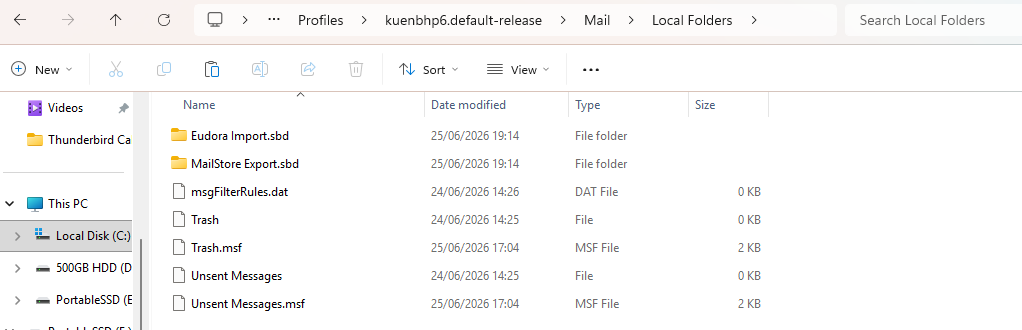
move them out from the sbd folders
Thanks for your reply. What are the sbd folders and where should I move them to (by them I suppose that you mean the Local Folders)?
Ọ̀nà àbáyọ Tí a Yàn
Your screenshot showed sbd folders in Local Folders.Copy the contents from the sbd folder and place directly in Local Folders.
Thank you for your instructions. I copied the contents and pasted them in two different folders. That is because I feel lost when I cannot find the folders which I work with in the left part of Windows Explorer. Anyway this has solved my problem. Even though I have taken up more space than necessary. Thank you very much.
You are most welcome. :)