


On Sunday, May 7, my thunderbird program suddenly stopped responding (neither the shortcut nor the program itself will run); I keep all incoming and outgoing emails in my thunderbird system and now am unable to access either - please help asap.

On Sunday, May 7, my Thunderbird program suddenly stopped responding (neither the shortcut nor the program itself will run); clicking on the shortcut icon or attempting to open or run the program itself causes the "loading" or spinning wheel icon to pop up, run for about 10 seconds, then stop.
I've used Thunderbird as an email client for my Sonic email account on my pc for over 8 years without any difficulties until now, and now seem to be locked out of my Thunderbird account. I cannot access it to confirm the version, although I believe it is current, since it appears to update automatically.
My Sonic account continues to function normally, but I keep (save) all incoming and outgoing emails in my Thunderbird system and now am unable to access any of those, and unable to access my Thunderbird account at all..
I've consulted with Sonic over this; Sonic maintains that any difficulty must be on my end connecting to Thunderbird, and suggested that I might have changed the account password. However, I have not changed the password, etc.
Please help asap.
Thanks, immensely.
Tim
Ọ̀nà àbáyọ Tí a Yàn
Hi, Lin.
I am e-ing to update you on positive events here. And to thank you, once again. This has been a highly educational exercise for me, which I greatly appreciate.
To cut to the chase, after various detours (see below), I went to write this update, but being generally brain dead here and operating on auto-pilot as usual, absent mindedly clicked on the Thunderbird shortcut sign-on icon in my task bar, rather than signing on to my Mozilla account. Almost instantly, realizing what I had inadvertently done, I anticipated that the process would go nowhere.
But to my surprise, my Thunderbird account opened, and downloaded all the emails I had sent and received at my Sonic account during this adventure.
This leads to my uneducated guess that clearing all the Thunderbird activity from my Windows task manager - as you suggested ! - a few days earlier had actually cleared the problem.
It's now been about 2 days since then, and Thunderbird has worked fine, just as it did before the events you have been kind enough to discuss with me. And I don't seem to have lost any of the old emails.
The longer story is this - Since your last email, I located and used the Windows resident compression tool which you suggested and used it to compress my Thunderbird folders (including the profile folder), which reduced them by half. Thanks for that education !
But when I went to transfer that compressed folder as a backup, Windows refused, stating that it was still too large - at 17GB or so - to copy to the 256GB flash drive.
So then I moved on to researching external hard drives, assessing what might work and how big I could go, where to purchase the same, etc. It was at that point that I tried to report to you but inadvertently hit the Thunderbird shortcut icon described above.
So thank you again for all your time, effort and patience on this.
Tim
PS: I will still buy an external hard drive and backup and reduce the files on my resident hard drive shortly, as you also suggested.
All Replies (6)

Sonic is probably right, it's more likely to be a problem on your end, not theirs.
What is your operating system? Is this an IMAP or POP account?
The first thing you should do, for safety, is make a backup copy of your Thunderbird data folder, including your Profile. Assuming Windows, its default location is "C:\Users\(your windows user name)\AppData\Roaming\Thunderbird". make a copy of this folder in a convenient location (Desktop?).
Now try to start Thunderbird in Troubleshoot Mode. Press <WindowsKey+R> to bring up the Run dialog box. Enter the command "thunderbird --safe-mode" (no quotes) and click OK. This will start Thunderbird with all add-ons disabled, in case one of them is misbehaving. If this works, you can permanently disable the add-ons and enable them one by one until you find the culprit. If this doesn't work, there are other things we can try, one of which may be completely uninstalling Thunderbird then re-installing. You have already made a backup of your profile, so your data is not in danger.
Thanks, Lin! Your instructions were clear and helpful. While trying to make the back up copy of the Thunderbird data folder, the image attached here below of a popup appeared, despite there being no open Thunderbird files (to my knowledge). Thoughts? Thanks! Tim
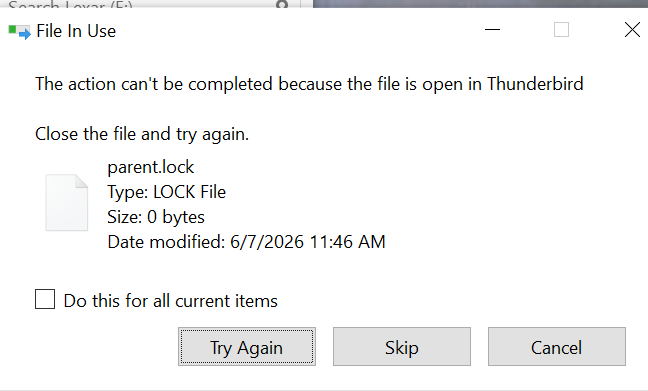
If Thunderbird was closed "ungraciously", there might actually still be a phantom process still running in the background. You can check using Windows' Task Manager and kill the processes from there, or better yet, simply reboot. The Parent.lock file is there mostly to prevent you from running more than one copy of Thunderbird against the same Profile, which could lead to data corruption. If you are sure there are no Thunderbird processes running, you can Skip the file. It will be recreated when needed.
Thanks, Lin. And thanks for the explanation - you are expanding my universe, which I really appreciate, along with your patience with my ignorance and ineptitude. So, thanks, again. New difficulties have arisen. Checking the Task Manager, there were over a dozen Thunderbird processes open, but none actively running it appeared. So I closed them all. My pc's hard drive shows 48.9GB free space. The pc's Thunderbird data folder was 26GB So I attempted to make the backup copy on a series of flash drives. First, I attempted to copy the Thunderbird data file to a 32GB flash drive. Another popup arose eventually, advising that there was not enough room on the (brand new, unused, empty) 32GB flash drive for a particular sub-folder. So I tried copying the data folder to a 256GB flash drive and encountered a similar message - that the data folder's 13.3GB inbox file is too large for the destination (i.e., the 256 GB flash drive). Does this mean I should get an external hard drive with a few terrabytes of space to copy the data folder? Or something else? Thanks again for your patience with this! Tim
If the process shows in Task Manager, it's running, so you were right to close them.
You can use Windows built-in zip compression, or use a utility like 7zip (https://www.7-zip.org/) to compress your Profile copy. You can uncompress it later if you need to use it. The compressed copy will be less then half the size of the uncompressed copy. My profile is about 4.5 GB and it compresses down to about 1.5 GB.
You are getting low on disk space. You should maybe consider getting an external USB hard drive to archive some stuff off the computer and free up some space. Multi-terrabye drives are not that expensive.
Ọ̀nà àbáyọ Tí a Yàn
Hi, Lin.
I am e-ing to update you on positive events here. And to thank you, once again. This has been a highly educational exercise for me, which I greatly appreciate.
To cut to the chase, after various detours (see below), I went to write this update, but being generally brain dead here and operating on auto-pilot as usual, absent mindedly clicked on the Thunderbird shortcut sign-on icon in my task bar, rather than signing on to my Mozilla account. Almost instantly, realizing what I had inadvertently done, I anticipated that the process would go nowhere.
But to my surprise, my Thunderbird account opened, and downloaded all the emails I had sent and received at my Sonic account during this adventure.
This leads to my uneducated guess that clearing all the Thunderbird activity from my Windows task manager - as you suggested ! - a few days earlier had actually cleared the problem.
It's now been about 2 days since then, and Thunderbird has worked fine, just as it did before the events you have been kind enough to discuss with me. And I don't seem to have lost any of the old emails.
The longer story is this - Since your last email, I located and used the Windows resident compression tool which you suggested and used it to compress my Thunderbird folders (including the profile folder), which reduced them by half. Thanks for that education !
But when I went to transfer that compressed folder as a backup, Windows refused, stating that it was still too large - at 17GB or so - to copy to the 256GB flash drive.
So then I moved on to researching external hard drives, assessing what might work and how big I could go, where to purchase the same, etc. It was at that point that I tried to report to you but inadvertently hit the Thunderbird shortcut icon described above.
So thank you again for all your time, effort and patience on this.
Tim
PS: I will still buy an external hard drive and backup and reduce the files on my resident hard drive shortly, as you also suggested.