


Windows 10 reached EOS (end of support) on October 14, 2025. If you are on Windows 10, see this article.

Search Support

Avoid support scams. We will never ask you to call or text a phone number or share personal information. Please report suspicious activity using the “Report Abuse” option.

Learn More
Èròjà atẹ̀lélànà yii ni a ti fi pamọ́ fọ́jọ́ pípẹ́. Jọ̀wọ́ béèrè ìbéèrè titun bí o bá nílò ìrànwọ́.
Solved A ti fi pamọ́ fọ́jọ́ pípẹ́

How can I add a task with a due date but no due time?

gelists+firefox

(None of the topics provided when creating the question seems to "best describe" this question. So I chose one at random.)

When I create a new task, I can choose a due date. But it seems that when choosing a due date, it forces me to also choose a due time. Is it possible to add a task with a due date but no due time? Maybe something akin to the "all day event" for calendar events?

This answer says to "choose the option 'All Day Event'", but I don't have this option when creating a task (see attached screenshot).

My workaround is to choose an arbitrary time. While this works somewhat, it's unsatisfactory.

Thanks for any help.
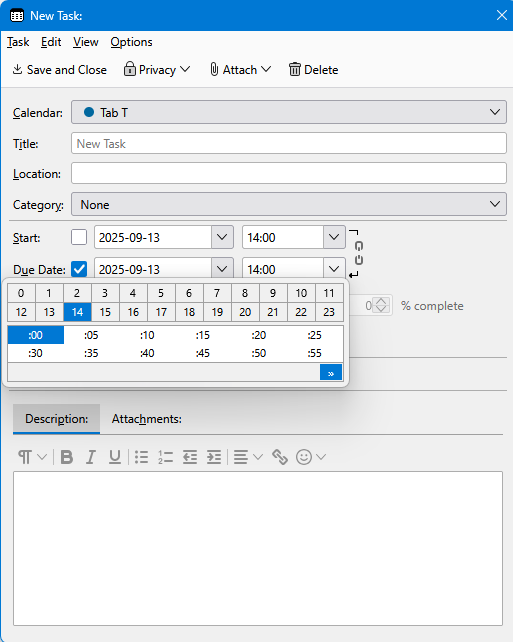
(None of the topics provided when creating the question seems to "best describe" this question. So I chose one at random.) When I create a new task, I can choose a due date. But it seems that when choosing a due date, it forces me to also choose a due time. Is it possible to add a task with a due date but no due time? Maybe something akin to the "all day event" for calendar events? [https://support.mozilla.org/en-US/questions/1486606 This answer] says to "choose the option 'All Day Event'", but I don't have this option when creating a task (see attached screenshot). My workaround is to choose an arbitrary time. While this works somewhat, it's unsatisfactory. Thanks for any help.
Ìsopọ̀ yíyà aṣàfihàn

All Replies (1)

Ọ̀nà àbáyọ Tí a Yàn

I just found this: Allday Tasks on Reddit.

It seems to provide what I asked for.

Ti ṣàtúnṣe nípa gelists+firefox