


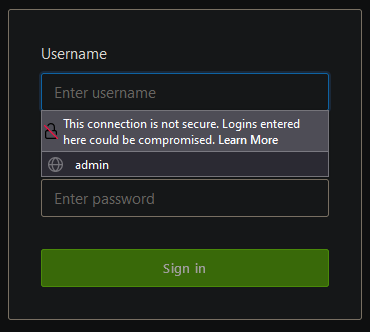
How to hide "This connection is not secure" when login on http websites
![[]](https://profile.accounts.firefox.com/v1/avatar/k)
This article about Insecure password warning in Firefox https://support.mozilla.org/en-US/kb/insecure-password-warning-firefox?as... didn't give any example how to hide it.
This old method https://support.mozilla.org/en-US/que.../1164003 doesn't work in the latest Firefox version.
How to hide "This connection is not secure" when login on http websites?
Ti ṣàtúnṣe nípa []
All Replies (1)
You can try this CSS code to the userChrome.css file in the chrome folder in the Firefox profile folder.
#PopupAutoComplete[resultstyles~="insecureWarning"] > richlistbox {
  height:auto !important;
}
#PopupAutoComplete[resultstyles~="insecureWarning"] > richlistbox > richlistitem[originaltype="insecureWarning"]{
  display:none!important;
}
More info about userChrome.css/userContent.css in case you are not familiar: *https://www.userchrome.org/what-is-userchrome-css.html
- https://www.userchrome.org/how-create-userchrome-css.html
- https://www.userchrome.org/firefox-changes-userchrome-css.html
In Firefox 69 and later you need to set this pref to true on the about:config page to enable userChrome.css and userContent.css in the chrome folder.
- about:config => toolkit.legacyUserProfileCustomizations.stylesheets = true
- https://support.mozilla.org/en-US/kb/about-config-editor-firefox