


Windows 10 reached EOS (end of support) on October 14, 2025. If you are on Windows 10, see this article.

Search Support

Avoid support scams. We will never ask you to call or text a phone number or share personal information. Please report suspicious activity using the “Report Abuse” option.

Learn More

Èròjà atẹ̀lélànà yii ni a ti fi pamọ́ fọ́jọ́ pípẹ́. Jọ̀wọ́ béèrè ìbéèrè titun bí o bá nílò ìrànwọ́.

Quick Filter for Inbox stuck on Unread

  • 2 àwọn èsì
  • 1 ní ìṣòro yìí
  • 243 views
  • Èsì tí ó kẹ́hìn lọ́wọ́ m_cathcart
  • Ti yanjú

I'm running the 102.0b8 (64-bit) release.

When I view the inbox for my Yahoo account, by default it shows only Unread. The Quick filter is NOT on(see attached). If I select the Unread Quick filter the display does NOT change, except in green it shows "67 messages".

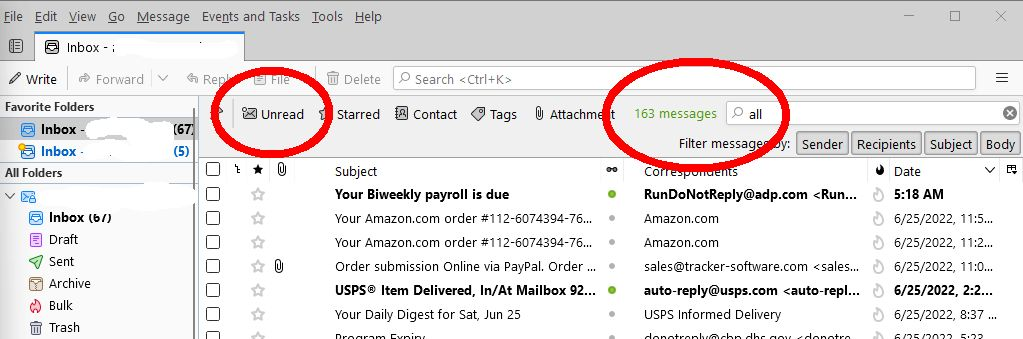
If I type All in the quick filter box it shows unread messages and a count of 163 messages.

Does anyone know how I can reset this behavior?

++Mark. https://ctproduced.com
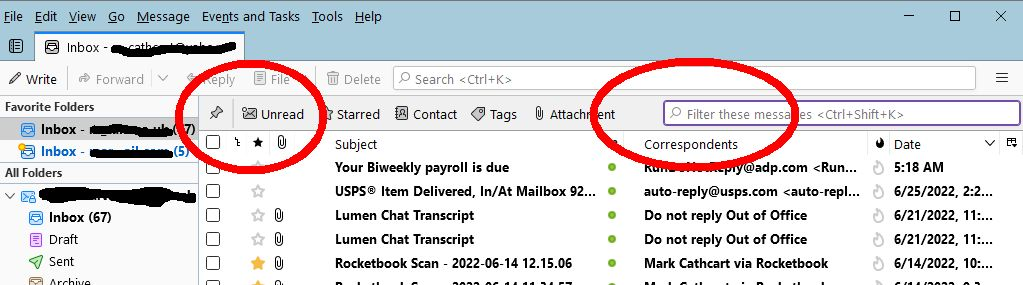
I'm running the 102.0b8 (64-bit) release. When I view the inbox for my Yahoo account, by default it shows only Unread. The Quick filter is NOT on(see attached). If I select the Unread Quick filter the display does NOT change, except in green it shows "67 messages". If I type All in the quick filter box it shows unread messages and a count of 163 messages. Does anyone know how I can reset this behavior? ++Mark. https://ctproduced.com
Ìsopọ̀ yíyà aṣàfihàn

Ọ̀nà àbáyọ tí a yàn

Sounds like you have the 'View' > 'Threads' > 'Unread' option selected. So I tested it and managed to reproduce the same.

Do this:

  • 'View' > 'Threads' > select 'All'
Ka ìdáhùn ni ìṣètò kíkà 👍 1

All Replies (2)

Ọ̀nà àbáyọ Tí a Yàn

Sounds like you have the 'View' > 'Threads' > 'Unread' option selected. So I tested it and managed to reproduce the same.

Do this:

  • 'View' > 'Threads' > select 'All'

Cheers! Thats another mistake(by me) I won't forget.