


Keybind is conflicted by default?

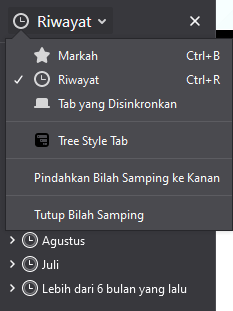
Ctrl+R (Maybe only exclusive in Indonesia version, which "Riwayat" means history/recent which makes sense) is used for opening History sidebar AND Refresh page. However, since firefox unable to modify keybinds leads to unfixable problem. Pressing Ctrl+R only refresh current page, not opening the history too. I would like to revert it back to Ctrl+H, because that's how most browser works too.
Ọ̀nà àbáyọ tí a yàn
This isn't a recent change. Found this push log from 2017.
 <!ENTITY historyButton.label            "Riwayat">
-<!ENTITY historySidebarCmd.commandKey   "h">
+<!ENTITY historySidebarCmd.commandKey   "r">
Maybe file a bug report to revert this specific change.
Ka ìdáhùn ni ìṣètò kíkà 👍 1All Replies (5)
I believe you can edit your shortcuts using the Saka extension, which is linked on this page,
https://support.mozilla.org/en-US/kb/keyboard-shortcuts-perform-firefox-tasks-quickly
Give that a shot.
Ọ̀nà àbáyọ Tí a Yàn
This isn't a recent change. Found this push log from 2017.
 <!ENTITY historyButton.label            "Riwayat">
-<!ENTITY historySidebarCmd.commandKey   "h">
+<!ENTITY historySidebarCmd.commandKey   "r">
Maybe file a bug report to revert this specific change.
evhenry said
I believe you can edit your shortcuts using the Saka extension, which is linked on this page, https://support.mozilla.org/en-US/kb/keyboard-shortcuts-perform-firefox-tasks-quickly Give that a shot.
There is no Open History option in Saka (on my device, or am I just blind?)
I don't see it either. It looks like it could be added. I'm taking a look.
Hi farsdewibs0n,
I believe you've filed a bug report here. As Romi said on the bug, this should be changed on the next version. Thanks for your report! (: