


Map area link not working

On https://ampelite.co.nz/ the header is a single bg image. I have added HTML to roughly Map the logo part, and link it to the home page. Works with all browsers except Firefox. From much research I suspect not having a real image may be the root, in which case a work-around would be useful.
Ọ̀nà àbáyọ tí a yàn
Try to ask advice at the Stack Overflow forum site.
Ka ìdáhùn ni ìṣètò kíkà 👍 0All Replies (6)
Screenshot of the issue? I see a small screen of the page nothing big to full the screen.
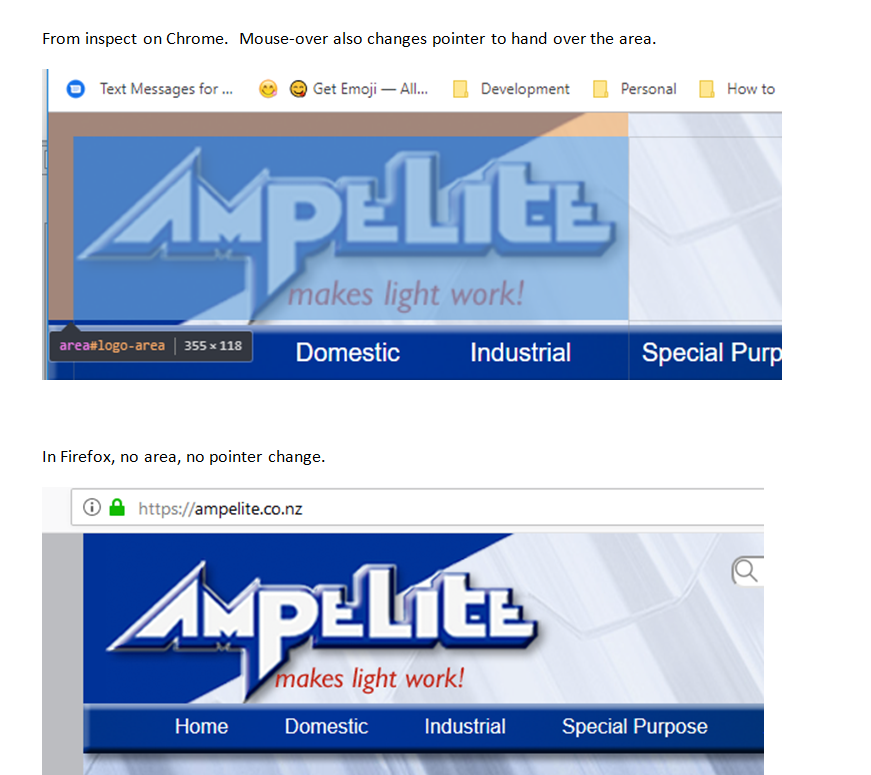
This what you wanted?
I am not a web developer, but I know how validate code that is sent to Firefox from a webpage to see what the W3C Nu HTML Checker comes up with.
https://validator.w3.org/nu/?doc=https%3A%2F%2Fampelite.co.nz%2F
See the 4. error: Element area is missing required attribute coords.
Hi @edmeister, nice tool, will be using it. Unfortunately that wasn't the problem.
NB: I am now working on a copy at https://ampelite.co.nz/Home_test.php
After playing with coords for a bit, I moved the header background image to in the img/usemaps - that also didn't help.
baffled, me .....
Ọ̀nà àbáyọ Tí a Yàn
Try to ask advice at the Stack Overflow forum site.
@edmeister: Co-ords was the main issue, I had to position stuff to put the clickable area in the right place. Thanks :-)