

Èròjà atẹ̀lélànà yii ni a ti fi pamọ́ fọ́jọ́ pípẹ́.
Jọ̀wọ́ béèrè ìbéèrè titun bí o bá nílò ìrànwọ́.

A ti fi pamọ́ fọ́jọ́ pípẹ́
suggestion

When you click the x in the top right corner and you have multiple tabs open; it would be nice to have the option to close the window or just the current tab.
When you click the x in the top right corner and you have multiple tabs open; it would be nice to have the option to close the window or just the current tab.
All Replies (3)
When you click the X in the top right corner, that means you want to close the browser. In Firefox we have this option to confirm your decission.
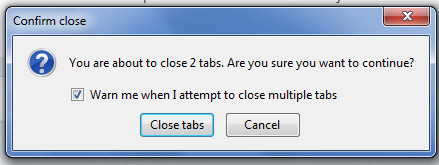
You can middle-click a tab with the mouse scroll wheel to close this tab or click the close X on the tab or use the right-click context menu.
Mijanur Rahman Rayhan said
When you click the X in the top right corner, that means you want to close the browser. In Firefox we have this option to confirm your decission.
Only if that is your only Firefox Window open.
Otherwise File > Quit/Exit closes the whole browser.