


Need help importing address books and folders from an old Thunderbird profile

Hi,
I just had to reinstall Windows 11 on my desktop computer because Windows Update would not update anything. It would start to install the update and upon the first reboot, it would fail with 0xc000021a and would back out the update. I tried updating Windows while keeping my data and it would fail at the first reboot with the same code.
I made note of where Thunderbird stored the profile (C:\Users\rayli\AppData\Roaming\Thunderbird\Profiles\pghy27s4.default, and C:\Users\rayli\AppData\Local\Thunderbird\Profiles\pghy27s4.default).
Prior to starting the wipe and reload installation I made a System Backup (using EaseUS ToDo Backup Home) of my boot drive (all 4 partitions). After the new copy of Windows was running I used the backup program to restore the above 2 files to the original location.
I then downloaded and installed the latest Thunderbird from the website and before I launched it the first time, I launched the Profile Manager from Terminal (Admin) and my old (restored profile) was not listed. I shut down the Profile Manger, launched Thunderbird, and proceeded to add my Comcast email account and my Gmail account.
What I need help with is recovering the 2 address books from the old profile and a folder where I save emails to.
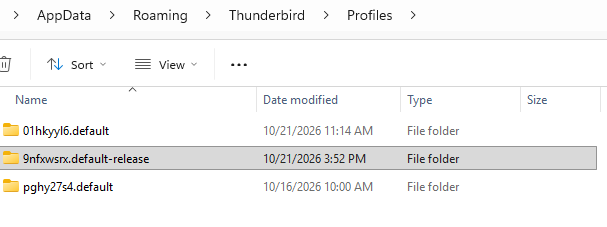
The current profile is stored in "C:\Users\rayli\AppData\Roaming\Thunderbird\Profiles\9nfxwsrx.default-release". The profile containing the info I need is in the same folder and is named "pghy27s4.default". I added a screenshot of the folder.
Note that I also have an SSD that I cloned my old system to, which I can install in my computer and boot from. My system has a second SSD (it is D:) that contains a lot of my data, so I can copy whatever I need to it.
With a previous Windows 11 reinstall-in-place attempt, I had used the Export function of Thunderbird to backup the profile. After updating Windows 11 I installed the latest Thuderbird and tried the Import function but it failed before completing the Import, so I did not Export this time.
All Replies (2)
Update: While keying in the above info, Thunderbird updated to 158.0.1.

If you have an intact copy of a profile, you can import its address books with the Import Tool.
- See menu item <tools | import from another thunderbird installation, then next < p></tools>
- Select Choose a profile folder, then Continue
- A browse window will open. Navigate to the saved Profile folder and choose Select Folder (in Windows)
- Deselect everything except for Address Books. Click Continue, then Start Import
If your account is IMAP, you don't need to import your remote messages - they will automatically download.
If you're looking for Local Folders and POP3 folders, I recommend using the add-on "ImportExportTools NG" (https://addons.thunderbird.net/en-US/thunderbird/addon/importexporttools-ng/) to import messages and folders from the saved profile into local folders in your new profile.
By the way, I think you should turn off the auto-update feature to prevent unexpected updates. See <Settings | General | Updates | Check for updates, but let me choose whether to install them>.