


Firefox crashes when loading Google Meet call.

Hi Firefox team,
I am having issues after updating to the latest version of Firefox. When opening a Google Meet meeting, my Firefox browser crashes and it keeps doing again and again. Otherwise, the browser works just fine.
The following is from the abouts:crashes webpage: ID: fcf6a6af-3c59-4e02-9d1b-3b2cf0210927 Signature: VTPixelTransferSessionCanUseMetalInTheBackground
Thank you, Yerkebulan
All Replies (3)

In the address bar, type about:crashes<enter>. Note: If any reports do not have BP- in front of the numbers/letters, click it to submit them.
The crash report is several pages of data. We need the report numbers to see the whole report.
Using your mouse, mark the most recent 7 - 10 Submitted crash reports, and copy them. Now go to the reply box and paste them in.
Please, Do not post a screenshot ! !
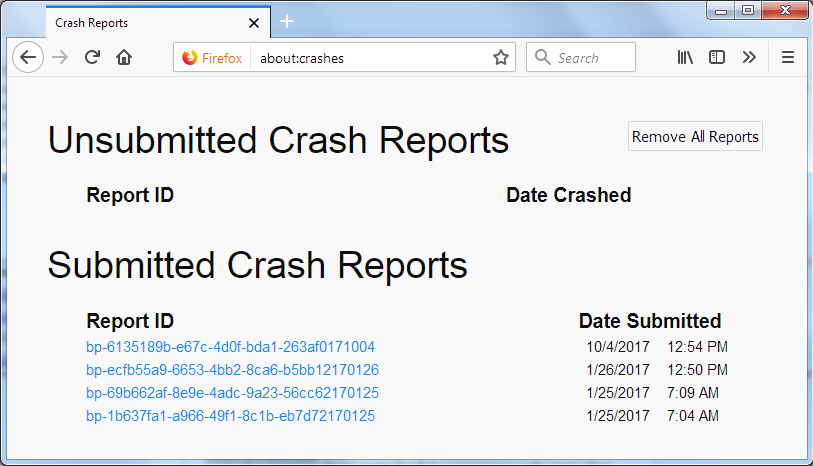
For more help on crash reports, see; https://support.mozilla.org/en-US/kb/firefox-crashes-asking-support
That looks like a problem with VideoToolbox that handles hardware-accelerated video encoding and decoding.
- bp-fcf6a6af-3c59-4e02-9d1b-3b2cf0210927
- Firefox 92.0 Crash Report [@ VTPixelTransferSessionCanUseMetalInTheBackground ]
- https://developer.apple.com/documentation/videotoolbox
Are there settings possible to change the video resolution or possibly disable video hardware acceleration ?
Hi there,
Thank you for your response.
Unfortunately, this doesn't explain why my browser crashes as I don't have any software for hardware-accelerated video encoding and decoding. Any other reasons?
Kind regards