


Profile Folder Rename/ESR to Release
I recently upgraded Thunderbird from v140.7-ESR to v147-Release and would be grateful if someone could answer some questions.
After upgrading I noticed there are 3 profile folders even though I am the only user of my Win11 laptop.
Profile Folders 92yfgi88.default-esr - 3.654 GB - 2026/01/23 12:50:27 >> My profile jf63jfuk.default-default - 1.533 GB - 2024/06/05 21:27:32 y9efj7q9.default - 47 Byte - 2026/01/23 12:30:15
The folder y9efj7q9.default only contains 2 files - parent.lock (0kb) and times.json (1kb).
1. Can I safely delete profiles I don't use?
2. Why is -ESR still shown at end of my profile folder name? - I thought it would be renamed when I changed to the release channel version.
3. Can I manually rename my profile folder? - I know I can rename a profile using Profile Manager but this doesn't rename the folder.
4. If not possible to rename my "92yfgi88.default-esr" folder, I assume I can just copy it's contents to another new profile folder and tell TBird to start using that?
5. Can I use Windows File Explorer to delete/rename profiles, or must this be done from within Thunderbird?
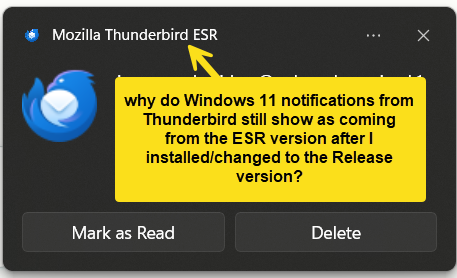
Also, any idea why Thunderbird Notifications still show as coming from Mozilla Thunderbird ESR, even though I now use the Release version? I've checked Windows 11 System > Notifications and it is still shown there as Mozilla Thunderbird ESR.. Why? and how to fix?
Thanks in advance..
VeeBee کی جانب سے میں ترمیمکی گئ
تمام جوابات (3)
First, although profile names have no specific function, do NOT rename them casually. That is because the thunderbird startup profile expects the same name as the last time. Just leave alone. The best you can do is to not have an unworkable system. Technically, you could rename the profile 'charlie' or 'suzie' and it would work just the same. but thunderbird has to know that's the name before it starts.
YES, thunderbird uses just one profile. you can safely delete all others from the ...appdata\roaming\thunderbird\profiles folder. I did that, as it was just wasted space.
Thanks for the info and confirming the old/unwanted profiles can be deleted to save space.
I just need to find out why mail notifications in Windows 11 still show as coming from Mozilla Thunderbird ESR even though I no longer use the ESR version.