

اس تھریڈ کو آرکائیوکیا گیا تھا۔
اگر آپ کو مدد کی ضرورت ہو تو براہ مہربانی نیا سوال پوچھیں۔

Solved
آرکائیو شدہ
I'm no longer offered the option to use FILELINK
3/30/2025 FILELINK NOT OFFERED
  Recently when sending a large file, I was offered the option to use  FILELINK. I don’t remember the exact message text, but I believe it was a  simple “Yes/No”.
  I responded “No” and I got another message offering a choice to never ask about FILELINK again. I thought that it was referring only to that specific message. Since then, when I want to send a file even larger than the one that got the FILELINK  message before, I’m not getting the option to use FILELINK.
  I believe that FILELINK is a useful tool. What do I need to do to get it back?
Thanks for your help, SweetTasha
3/30/2025
FILELINK NOT OFFERED
Recently when sending a large file, I was offered the option to use FILELINK. I don’t remember the exact message text, but I believe it was a simple “Yes/No”.
I responded “No” and I got another message offering a choice to never ask about FILELINK again. I thought that it was referring ''only to that specific message''. Since then, when I want to send a file even larger than the one that got the FILELINK message before, I’m not getting the option to use FILELINK.
I believe that FILELINK is a useful tool. What do I need to do to get it back?
Thanks for your help,
SweetTasha
SweetTasha کی جانب سے میں ترمیمکی گئ
تمام جوابات (3)

منتخب شدہ حل
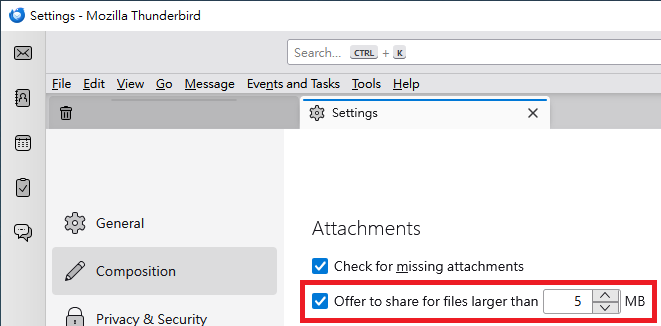
The following steps might be helpful: "Settings" > "Composition" > "Attachments" section > tick "Offer to share for files larger than __ MB". (Please see the attached image.)
Yu5tiqX9og, Thanks! Your reply solved the problem. But I have a related problem. I'll open a new question for that.

The "related problem" has also been resolved.