


how do I change the screen so I can use French diacritical marks? I changed my Windows setting, but to no avail.

I am taking a French class and that language uses diacritical marks. How do I update/modify Firefox so I can use same.
تمام جوابات (3)

Type about:preferences#content<enter> in the address bar.
On the bottom of the page, find Languages. To its right, press the Choose button. Make sure the correct language and district are selected.
Language Packs https://support.mozilla.org/en-US/kb/use-firefox-interface-other-languages-language-pack
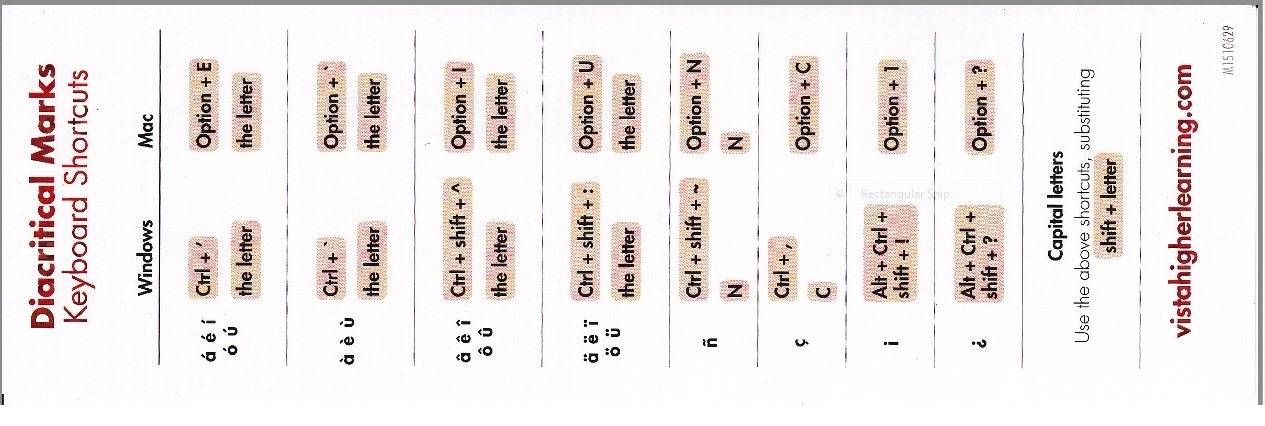
Your suggested solution changes the entire screen(s) to display in French. That's not my issue. I'm attaching an image my French professor gave out. She cannot help me with this issue, saying she has an international keyboard (whatever the hell that is).
Does this help at all?
Thanks, Arlene
I've called for more help for you.