


Search box shortcuts gone since update

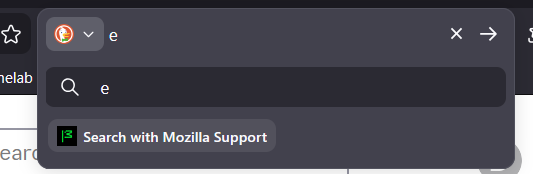
Hi, since the new update the shortcuts/search buttons on the smaller search box (desktop, windows) are gone, and I can't figure out how to get them back, nor can I find anyone asking about the same issue so far. It's happened on every device that's gotten the update. I added a screenshot so you know what I mean. There were always shortcut buttons under the textbox, so I can quickly search in google maps or wikipedia etc. but now there's only the dropdown menu. on the left. I used those buttons a lot so I definitely want those back! Thanks
Обране рішення
I found a solution, thought I'd post it for others. You'll want to put about:config into your normal search bar, and there change the setting browser.search.widget.new to False.
Читати цю відповідь у контексті 👍 0Усі відповіді (2)
Вибране рішення
I found a solution, thought I'd post it for others. You'll want to put about:config into your normal search bar, and there change the setting browser.search.widget.new to False.
Змінено dsmits
Hello
A space for users to give product feedback https://support.mozilla.org/en-US/kb/what-mozilla-connect
https://connect.mozilla.org/t5/discussions/update-149-0-made-searching-more-difficult/td-p/120608