


Windows 10 reached EOS (end of support) on October 14, 2025. If you are on Windows 10, see this article.

Avatar for Username

Шукати в статтях підтримки

Остерігайтеся нападів зловмисників. Mozilla ніколи не просить вас зателефонувати, надіслати номер телефону у повідомленні або поділитися з кимось особистими даними. Будь ласка, повідомте про підозрілі дії за допомогою меню “Повідомити про зловживання”

Докладніше
Ця тема перенесена в архів. Якщо вам потрібна допомога, запитайте.
Вирішено Архівовано

Disable prompt to generate a secure password

kmcdowell1701

I use an independent password manager to store my passwords and prefer it over Firefox's because it has a highly customizable generator for creating new passwords. However whenever I am on a new site, Firefox pops up with a prompt to generate a secure new password (it appears as a drop-down from the item text box). My password manager also creates a pop up/drop down, but it is hidden behind Firefox's and I cannot access it. I need to be able to disable the secure password generator prompt. Please take a look at my excellently annotated screenshot, attached.
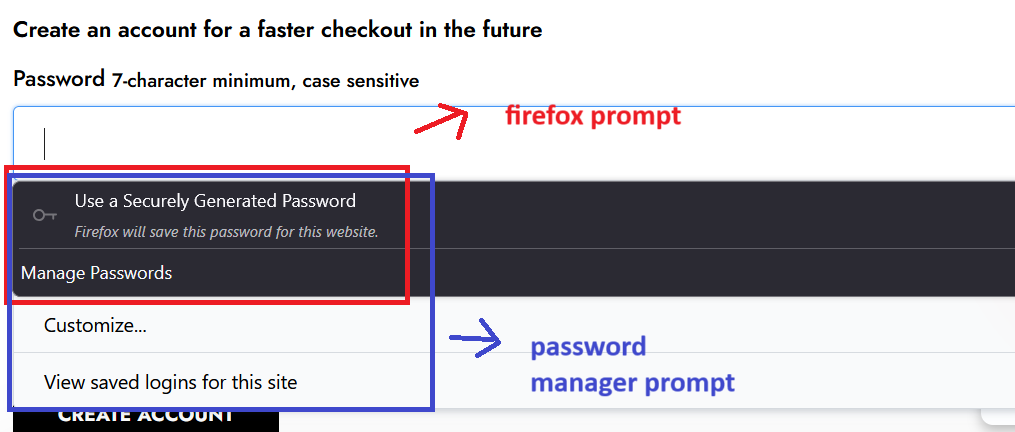
I use an independent password manager to store my passwords and prefer it over Firefox's because it has a highly customizable generator for creating new passwords. However whenever I am on a new site, Firefox pops up with a prompt to generate a secure new password (it appears as a drop-down from the item text box). My password manager also creates a pop up/drop down, but it is hidden behind Firefox's and I cannot access it. I need to be able to disable the secure password generator prompt. Please take a look at my excellently annotated screenshot, attached.
Вкладені знімки екрана

Усі відповіді (3)

Вибране рішення

Could you try this:

On the Settings page, in the tiny search box, type strong pass to filter the page.

Uncheck the box for "Suggest strong passwords"

Does that eliminate the suggestion?

Actually, if you don't intend to use the built-in password manager, you can just completely turn it off in that section section of the Settings page.

Thank you! Couldn't find that checkbox, thank you for pointing me to it.