


Windows 10 reached EOS (end of support) on October 14, 2025. If you are on Windows 10, see this article.

Шукати в статтях підтримки

Остерігайтеся нападів зловмисників. Mozilla ніколи не просить вас зателефонувати, надіслати номер телефону у повідомленні або поділитися з кимось особистими даними. Будь ласка, повідомте про підозрілі дії за допомогою меню “Повідомити про зловживання”

Докладніше
Ця тема перенесена в архів. Якщо вам потрібна допомога, запитайте.
Архівовано

NordPass browser extension will not allow login

markwarner22 replied
jaredpberger

Hello, I'm having a problem with the NordPass Firefox browser extension. I have already troubleshot this issue with NordPass and they are passing it off as a Firefox problem.

Issue: When logging into the NordPass browser extension, my username and password are accepted, then Cloudflare does a human verification, then the extension throws error 1004 (Something went wrong) [screenshot of error attached].

Troubleshooting: - Tried updating Firefox to latest version - Tried clearing cache/cookies - Tried uninstalling/reinstalling browser extension - Tried uninstalling/reinstalling firefox

Additional: - Dell Optiplex 7090 running Windows 10 Pro - Issue is specific to this computer only - Extension was working as recently as 2 weeks ago - Currently, NordPass allows me to sign in successfully on my phone, in Chrome browser extension on affected computer, and in Firefox browser extension on different computer.

Latest answer from NordPass team: [Please note that our developers have investigated provided logs and traces, however, there is nothing wrong with the backend flow - it looks like there is an issue with localStorage or cookies as the NordPass extension is not able to fetch properly the token obtained from NordAccount login flow. As this is not reproducible on other platforms and traces do not show anything else, we can only suggest the verification of extension/firefox browser configuration, especially in terms of cookies, local storage and session.]

Any suggestions on root cause, or settings changes to fix this issue are appreciated.
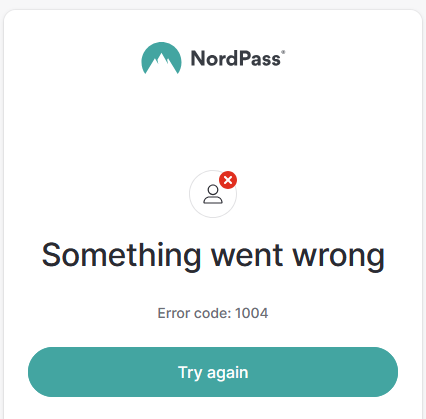
Hello, I'm having a problem with the NordPass Firefox browser extension. I have already troubleshot this issue with NordPass and they are passing it off as a Firefox problem. Issue: When logging into the NordPass browser extension, my username and password are accepted, then Cloudflare does a human verification, then the extension throws error 1004 (Something went wrong) [screenshot of error attached]. Troubleshooting: - Tried updating Firefox to latest version - Tried clearing cache/cookies - Tried uninstalling/reinstalling browser extension - Tried uninstalling/reinstalling firefox Additional: - Dell Optiplex 7090 running Windows 10 Pro - Issue is specific to this computer only - Extension was working as recently as 2 weeks ago - Currently, NordPass allows me to sign in successfully on my phone, in Chrome browser extension on affected computer, and in Firefox browser extension on different computer. Latest answer from NordPass team: [Please note that our developers have investigated provided logs and traces, however, there is nothing wrong with the backend flow - it looks like there is an issue with localStorage or cookies as the NordPass extension is not able to fetch properly the token obtained from NordAccount login flow. As this is not reproducible on other platforms and traces do not show anything else, we can only suggest the verification of extension/firefox browser configuration, especially in terms of cookies, local storage and session.] Any suggestions on root cause, or settings changes to fix this issue are appreciated.
Вкладені знімки екрана

Усі відповіді (1)

That is a Nordpass support to resolve that issue.