Windows 10 reached EOS (end of support) on October 14, 2025. For more information, see this article.

Шукати в статтях підтримки

Остерігайтеся нападів зловмисників. Mozilla ніколи не просить вас зателефонувати, надіслати номер телефону у повідомленні або поділитися з кимось особистими даними. Будь ласка, повідомте про підозрілі дії за допомогою меню “Повідомити про зловживання”

Докладніше

Ця тема перенесена в архів. Якщо вам потрібна допомога, запитайте.

Changing my saved credit card payment methods

more options

I have attempted to remove some saved credit card payment methods Following the instructions on your support website, I have succeeded on the first three instructions. But on the 4th step, I am instructed to choose one of the following - Add, Edit or Remove .

1) Only the "add" prompt works. But it won't accept the credit card number I enter.

2) What is more, I cannot access the other two prompts.

What should I do?

I have attempted to remove some saved credit card payment methods Following the instructions on your support website, I have succeeded on the first three instructions. But on the 4th step, I am instructed to choose one of the following - Add, Edit or Remove . 1) Only the "add" prompt works. But it won't accept the credit card number I enter. 2) What is more, I cannot access the other two prompts. What should I do?

Усі відповіді (1)

more options

Hi, is this in Firefox for Windows? (Your question posted under Thunderbird, the email program.)

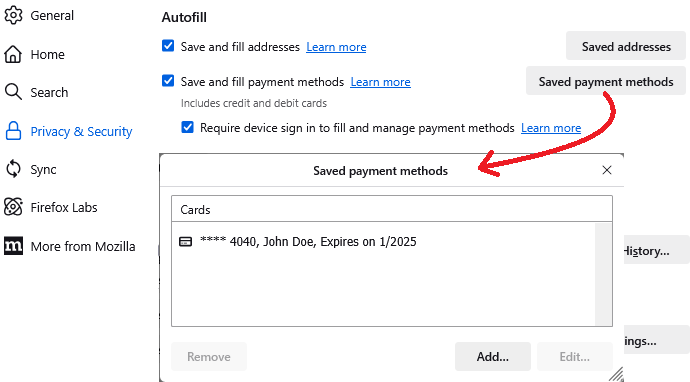
I created a sample card for testing. I have attached a screenshot of what that looks like.

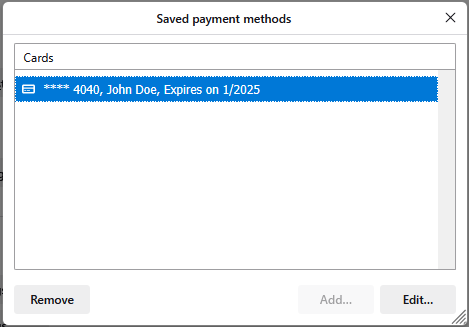
In order to enable Edit and Delete, I need to click on that card to select it. I have attached a screenshot of what that looks like.

Yours doesn't change the available buttons when you select a card that you want to remove?