


How to start in safe mode without prompt?

I'm testing a website I'm developing and I'm opening Firefox in Safe Mode using a batch file with this command, which works:
"C:\Program Files\Mozilla Firefox\firefox.exe" -private-window -safe-mode "https://localhost/myWebsite"
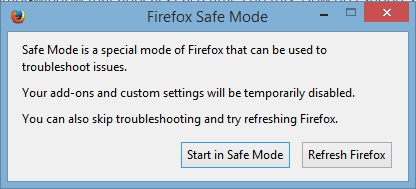
However, there is a confirmation prompt window that appears each time I do this. How do I suppress the confirmation prompt window?
Змінено tomfirefox
Усі відповіді (4)
Why do you need Safe Mode?
Could you possibly use a new clean profile instead without installed extensions for testing?
You can add -no-remote to the command line to open another Firefox instance with its own profile and run multiple Firefox instances simultaneously.
I don't need to get into the various reasons why I wish to start this in SafeMode. I simply want to know how to suppress the prompt. How do I suppress the prompt?
By suppressing the prompt, you will also disable Safe Mode altogether ....... and that's not what you want, is it ?
In 'about:config' - preference : 'toolkit.startup.max_resumed_crashes' : you can set the value to -1 (minus one)
Are you starting Firefox with the -safe-mode command line switch?
You can't suppress that prompt when you start Firefox that way. You can look at the Safe Mode startup code in this file to see how it works:
Змінено cor-el