


Windows 10 reached EOS (end of support) on October 14, 2025. If you are on Windows 10, see this article.

Шукати в статтях підтримки

Остерігайтеся нападів зловмисників. Mozilla ніколи не просить вас зателефонувати, надіслати номер телефону у повідомленні або поділитися з кимось особистими даними. Будь ласка, повідомте про підозрілі дії за допомогою меню “Повідомити про зловживання”

Докладніше

Ця тема перенесена в архів. Якщо вам потрібна допомога, запитайте.

How do I get the top bar back that shows page description and the Firefox logo?

  • 2 відповіді
  • 1 має цю проблему
  • 142 перегляди
  • Остання відповідь від Alex_Rose
  • Вирішено

The bar at the top of Firefox that appears on every program above the menu bar is gone.

As in, the bit that normally displays the page title, and the firefox logo. It now looks indistinguishable from Chrome. I'm not in full screen mode.

When I click and drag firefox to the top of my screen to snap it to my monitor size, the firefox logo and the title are shown for the instant until it snaps, but as soon as it snaps it's gone (and generically everywhere).

I want to be able to see what browser I'm in at a glance, and see the title of the page I'm on. How can I resolve this?

The bar at the top of Firefox that appears on every program above the menu bar is gone. As in, the bit that normally displays the page title, and the firefox logo. It now looks indistinguishable from Chrome. I'm not in full screen mode. When I click and drag firefox to the top of my screen to snap it to my monitor size, the firefox logo and the title are shown for the instant until it snaps, but as soon as it snaps it's gone (and generically everywhere). I want to be able to see what browser I'm in at a glance, and see the title of the page I'm on. How can I resolve this?

Обране рішення

You can find the button to enable the window title bar at the bottom left of the customize window.

  • 3-bar Firefox menu button > Customize > Title Bar
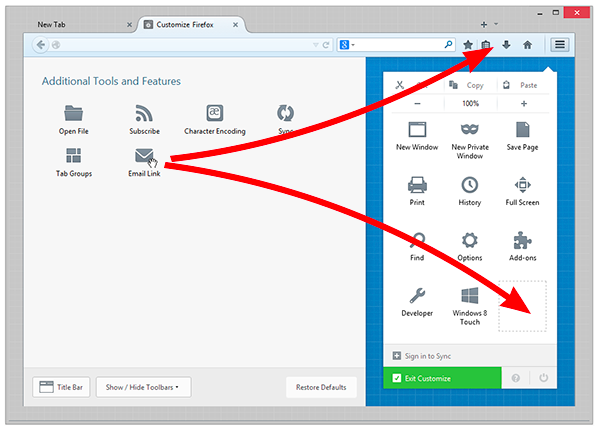
Customize Fx 29 Win8
Читати цю відповідь у контексті 👍 2

Усі відповіді (2)

Вибране рішення

You can find the button to enable the window title bar at the bottom left of the customize window.

  • 3-bar Firefox menu button > Customize > Title Bar
Customize Fx 29 Win8