


Windows 10 reached EOS (end of support) on October 14, 2025. If you are on Windows 10, see this article.

Search Support

Avoid support scams. We will never ask you to call or text a phone number or share personal information. Please report suspicious activity using the “Report Abuse” option.

Learn More
Open

Authentication error when adding Outlook.com account to Thunderbird

Francesco Saw

I am trying to add my outlook.com account to Thunderbird, but I keep receiving an authentication error. The authentication process initially appears to work correctly: I am redirected to the Microsoft sign-in page, I successfully log in, and I grant Thunderbird the requested permissions to access my Outlook account.

After completing the Microsoft authentication successfully, I am returned to Thunderbird (image 1). However, when I click “Continue”, Thunderbird reports an authentication error (image 2).

I have already tried several troubleshooting steps: - clearing/resetting cookies, saved credentials, and permissions both in Thunderbird and on the Microsoft account side; - repeating the entire setup process from scratch several times; - testing the same account on two completely different PCs, with exactly the same result; - confirming that IMAP is enabled for the account; - checking the Microsoft account sign-in and authentication settings.

I also contacted Microsoft Support, and they stated that they could not find any issue with the account.

What makes this particularly strange is that another Microsoft account ending in hotmail.it, using the same IMAP/SMTP settings and OAuth2 authentication, can be added to Thunderbird without any problem. The issue therefore appears to be specific to this particular outlook.com account.

Has anyone experienced a similar issue? Are there any logs, advanced settings, or additional troubleshooting steps I can use to determine why the OAuth login appears to complete successfully, but Thunderbird then fails with an authentication error?

Thank you in advance for your help.
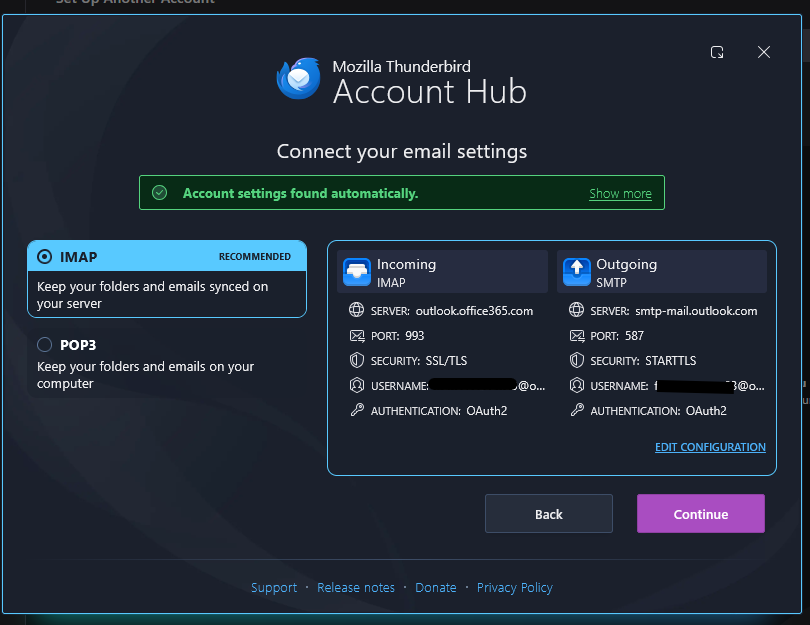
I am trying to add my outlook.com account to Thunderbird, but I keep receiving an authentication error. The authentication process initially appears to work correctly: I am redirected to the Microsoft sign-in page, I successfully log in, and I grant Thunderbird the requested permissions to access my Outlook account. After completing the Microsoft authentication successfully, I am returned to Thunderbird (image 1). However, when I click “Continue”, Thunderbird reports an authentication error (image 2). I have already tried several troubleshooting steps: - clearing/resetting cookies, saved credentials, and permissions both in Thunderbird and on the Microsoft account side; - repeating the entire setup process from scratch several times; - testing the same account on two completely different PCs, with exactly the same result; - confirming that IMAP is enabled for the account; - checking the Microsoft account sign-in and authentication settings. I also contacted Microsoft Support, and they stated that they could not find any issue with the account. What makes this particularly strange is that another Microsoft account ending in hotmail.it, using the same IMAP/SMTP settings and OAuth2 authentication, can be added to Thunderbird without any problem. The issue therefore appears to be specific to this particular outlook.com account. Has anyone experienced a similar issue? Are there any logs, advanced settings, or additional troubleshooting steps I can use to determine why the OAuth login appears to complete successfully, but Thunderbird then fails with an authentication error? Thank you in advance for your help.
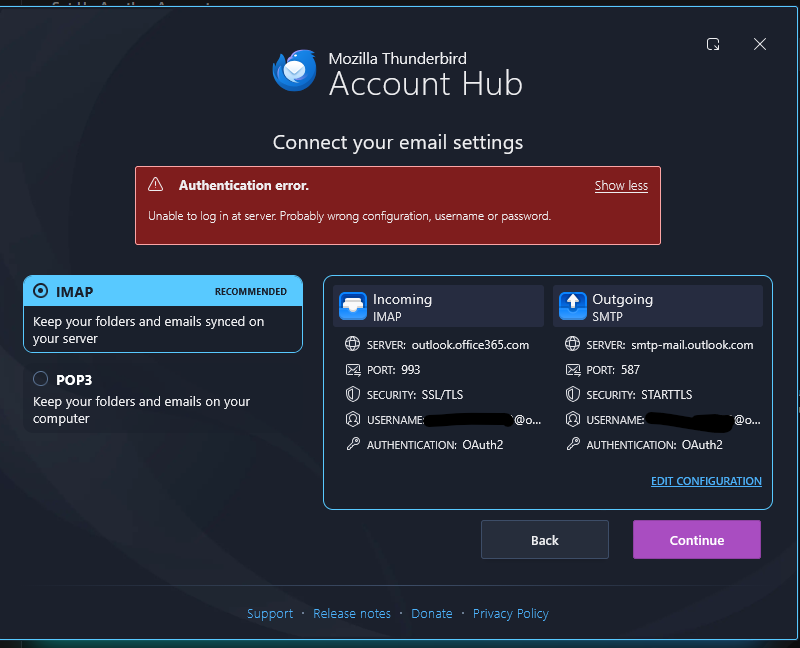
Attached screenshots

All Replies (1)

Microosft sta modificando i criteri di accesso ad Outlook. Verifica qui in quale situazione va collocato il tuo indirizzo: https://support.mozilla.org/it/kb/microsoft-ews-graph-migrazione

Ask a question

You must log in to your account to reply to posts. Please start a new question, if you do not have an account yet.