


How to change font sizes in all Thunderbird windows? UNIQUE!

Prelude: Monitor specs matter: Samsung Odyssey G93SC [Monitor] 1194.7 × 365 × 180.8 mm (approx. 47 × 14.4 × 7.1 inches) on a NVIDIA GeForce RTX 5080 [Display adapter] Display is 5120 x 1440 (recommended) Scale = 100% ISSUE: Fonts in Thunderbird size varies from readable to very hard to read.
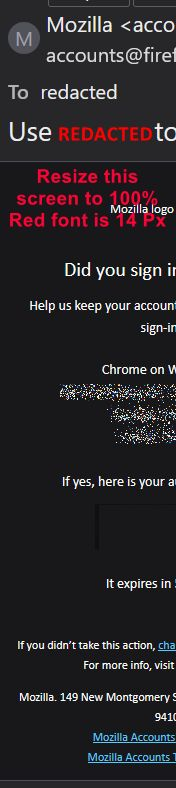
Screencap below with filename [font-size-R4--181158.jpg] on your device at 100%, I hope, will show what I see.
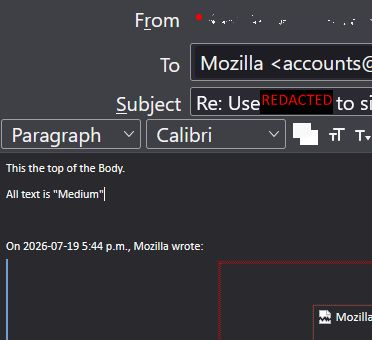
Some Fonts in different Thunderbird 'panes' are unreadable without zooming in. The {body} of a reply is very small (see font-size-body--Rev3-07-19-2026_01.jpg below) The image will show the cursor at top left of Body.
I did search here but nothing of this nature it. So here is my question:
QUESTION: Is there a way to edit a config file or the likes to set fonts to be responsive (like a web site is same in any size screen and compensates for size?
Thanks for the read,
~r
All Replies (2)

Use TB menu > Density and Font Size for the Folder and Message Panes.
For viewing and composing messages, do this:
- go to TB menu > Settings > General > Language & Fonts > Fonts > click 'Advanced' button
- at the top, set 'Fonts for:' to Latin if it isn't already
- change Proportional and Monospace fonts/sizes to your liking
- set Minimum font size to 14 or None if you want a small font size.
- at the top, change set 'Fonts for:' to Other Writing Systems
- repeat the process of changing fonts/sizes
- at the bottom, make sure 'Allow messages to use other fonts' is disabled if desired > OK > close the popup
It is sad that folk think they know better and specify a font size for you.
I see a number of topsic going back 10 years the the forum has picked as "see also" and while the locations have moved my reply from 2016 still covers it.
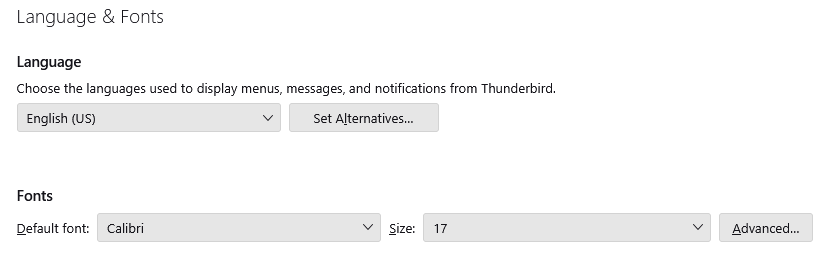 then using the Advanced button
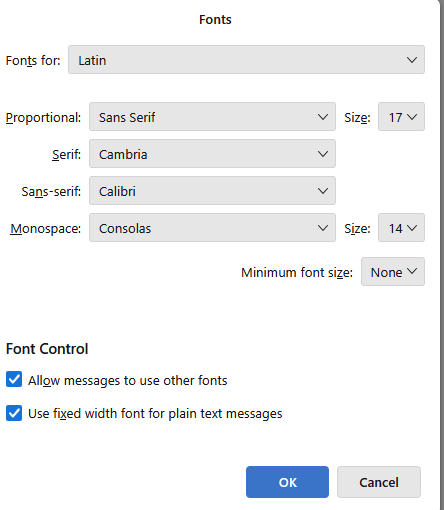 Set minimum font sizes and seriously consider not allowing the sender to specify the font at all. Most folk send email specifying a size and it is often rubbish because the more likely they are to specify a size (like in outlook) the less likely they are to use a web safe font.
Note sizes are in pixels not points so you have to allow that any size will be less than you expect in points. 17 pixels = about 12 points usually) a point is supposed to be 1/72 of an inch. But the further we get away from communicating by printing on paper with word processors the less often that is what is actually used. See https://en.wikipedia.org/wiki/Point_(typography) A fascinating subject that most folk know nothing at all about yet have expectations based on their limited exposure.