


New PC Thunderbird installation - unable to right click delete files in Bin folder

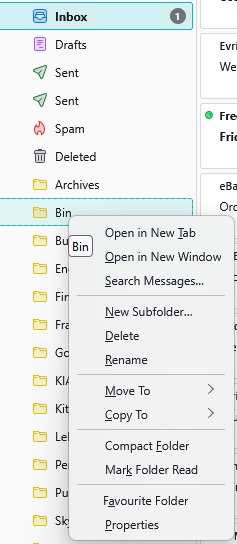
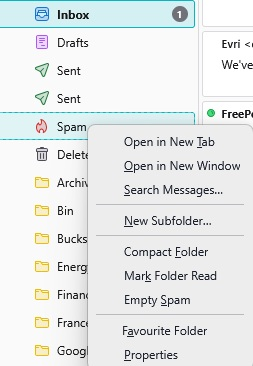
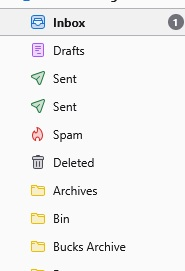
New W11 Pro pc, so new installation of Thunderbird. All profiles and folders moved over ok, but the Bin folder is an issue (main Gmail account IMAP). In my previous Tbird installation, I was able to right click the Bin folder, and be given the option of emptying said folder. Not now. The Spam folder does have the Empty option. Pics illustrate the folder list, what happens when I right click the Bin folder, and what happens when I right click the Spam folder, which does have the 'Empty Spam' option. I can highlight the messages in the Bin folder and delete them that way, but the right click option is shorter, easier... The only item I can find in the Thunderbird help pages tell me to delete the Trash and Trash msf folders in the profile - tried this twice, with no difference. It's a little frustrating... Any help would be welcomed, I guess I'm missing something really simple...

Chosen Solution
Hi Simon,
The problem is more complex and perhaps more specific to Gmail, which I do not use, than it seemed at first. I don't know if I can help. Let us hope that someone else responds.
In the meantime, I was able to reproduce some of your symptoms. Here's what I tentatively believe:
Some user-created folders are being used as special IMAP folders (gmail labels). Check in account settings > server settings for which folder/label is set to be used for trash. The proper folder/label for trash seems to be "Bin". Make sure that Bin is selected in server settings. The icon next to Bin in the folder pane should change to a trash can. Then move messages from any other trash folders into Bin. Go to webmail. Delete the other trash folder(s), Re-start Thunderbird.
Take similar actions for the sent folders: Check in account settings > copies & folders for which folder/label is being used for sent messages. Make sure that is the "Sent Mail" folder/label, which seems to be the proper one in Gmail. Move messages from other sent folders into "Sent Mail". Go to webmail. Delete the other sent folder(s), Re-start Thunderbird.
Such actions worked for me in a non-gmail account. I suggest that you wait for other responses before taking these actions.
All Replies (8)
The "Bin" folder is not recognized as a trash folder. It seems to be a user-created folder. The folder for trash seems to be "Deleted". Where do messages go when you delete them?
Hi, The Bin folder is not one that I have added - this is a brand new PC, and a brand new Thunderbird installation to which I have brought over my profiles. As I can no longer access my old PC, I cannot be sure there was a Bin folder there previously..... When I delete emails now, they go into the Deleted folder, not the Bin...if I delete the emails on the Bin folder, they go into the Deleted folder... The Bin folder also seems to have emails in it during the stages of my composing them - I composed a long email last night, and there are several versions of this incomplete email in the Bin folder... If I delete the Bin folder, should this solve the issue altogether, do you think? Also - I weirdly have two Sent folders for the same account, with differing emails in them, all going back months...this was definitely the same on my old PC...no idea what to do about this...
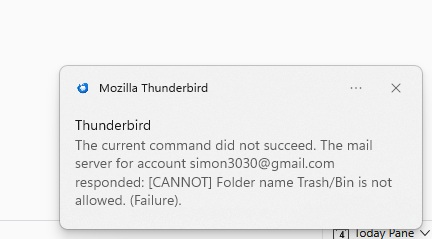
I've tried to delete the Bin folder and got this message:
Simon said
Hi, The Bin folder is not one that I have added - this is a brand new PC, and a brand new Thunderbird installation to which I have brought over my profiles. As I can no longer access my old PC, I cannot be sure there was a Bin folder there previously..... When I delete emails now, they go into the Deleted folder, not the Bin...if I delete the emails on the Bin folder, they go into the Deleted folder... The Bin folder also seems to have emails in it during the stages of my composing them - I composed a long email last night, and there are several versions of this incomplete email in the Bin folder... If I delete the Bin folder, should this solve the issue altogether, do you think? Also - I weirdly have two Sent folders for the same account, with differing emails in them, all going back months...this was definitely the same on my old PC...no idea what to do about this...
If you brought over your old profiles, then it is not a brand new installation. Apparently, the "Bin" folder came from your previous computer. In your first message, you wrote that you used Bin as your trash folder on your previous computer. Here you wrote that you cannot be sure that there was a Bin folder on your previous computer. Because you copied your profiles on to your new computer, the folders should be exactly as they were on your previous computer.
Bin is working exactly as a user-created folder should work. It is not a trash folder. If drafts are being saved there, you should check the setting for where drafts are saved in account settings > copies & folders.
There was no apparent problem to solve until you learned that you cannot delete the Bin folder. Since gmail does not allow it, it will not be sync'd with the server. In your place, I would create a new folder, copy the messages from Bin to the new folder, close Thunderbird, delete Bin in the file system, open Thunderbird, and confirm that Bin is gone. Do you need instructions for doing that?
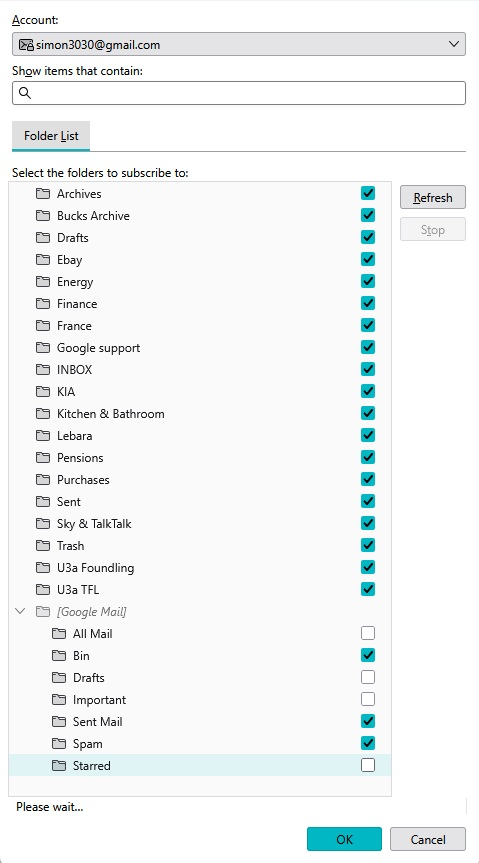
I don't know why you have two sent message folders. Right click on the account name in the folder pane and select "Subscribe". How many "sent" folders appear in the list? If there is only one, unsubscribe from it. If there is more than one, please stop and report your findings.
Then check the contents of the remaining sent folder. Does it have messages? If not, try to delete it. If it has no messages and you are able to delete it, re-subscribe to the other sent folder. Then check account settings > copies & folders and make sure that the remaining sent folder is selected as the place to save sent messages. If you start seeing duplicates of sent messages there, you probably don't need any folder to be selected in copies & folders for sent messages.
If it has messages or you are not able to delete it, please stop and report your findings.
EDIT: The "Bin" folder is indeed being sync'd. Apparently, Gmail did not allow deleting it because it is a special IMAP folder. Gmail must recognize it as the trash folder.
Modified by Rick
Thanks for the detailed and helpful reply.
I'll work my way through it and reply once I have. Appreciate your help.
Hi Rick, Some progress, maybe - following your notes, I have this (as attached) - I have no idea whether this format is common to all Thunderbird Gmail installations, or whether this is my own incorrect manufacture. This is where the two Sent folders in my folder list come from, I assume... The top Sent folder has 863 messages, the lower one has over 3,000. Comparing the T'bird Sent folders with the Gmail Sent folder, open in a browser, the emails in the 'lower' Sent folder correlate exactly with the browser version.
I have another Gmail account in Thunderbird, so I had a look at that one - it had one Sent folder, so I right clicked >subscribe, and there was the same again - a separate folder list below the main one, with a Sent folder, unticked; I ticked it, and lo and behold there appeared 700 messages. Both folders have messages going back years, so no idea at all why this is so.
I am unsure what to do here, I really need some assistance as to why the folder structure in my Thunderbird is as it is. Assuming that the Sent folder that mimics that in the browser Gmail, then I would assume that this the only one I should be subscribed to (for both Gmail accounts)?
The Bin folder still presents an issue - I understand now that the Bin folder comes from Gmail, hence why I can't delete the folder, but don't know why when I choose to delete an email it goes here rather than straight into the 'Deleted' folder, which I can right click to empty. I've just sent a test email to my other Gmail account, replied to it, and then deleted it - the deleted email only appeared in the Deleted folder, not the Bin folder; it does not appear in the Bin folder in browser accessed Gmail - so, am I best to unsubscribe from the Bin folder in an effort to stop my confusion, I'm assuming this will not cause any issues?
Thanks for your help, it's much appreciated....signed, an old codger...
Modified by Simon
Chosen Solution
Hi Simon,
The problem is more complex and perhaps more specific to Gmail, which I do not use, than it seemed at first. I don't know if I can help. Let us hope that someone else responds.
In the meantime, I was able to reproduce some of your symptoms. Here's what I tentatively believe:
Some user-created folders are being used as special IMAP folders (gmail labels). Check in account settings > server settings for which folder/label is set to be used for trash. The proper folder/label for trash seems to be "Bin". Make sure that Bin is selected in server settings. The icon next to Bin in the folder pane should change to a trash can. Then move messages from any other trash folders into Bin. Go to webmail. Delete the other trash folder(s), Re-start Thunderbird.
Take similar actions for the sent folders: Check in account settings > copies & folders for which folder/label is being used for sent messages. Make sure that is the "Sent Mail" folder/label, which seems to be the proper one in Gmail. Move messages from other sent folders into "Sent Mail". Go to webmail. Delete the other sent folder(s), Re-start Thunderbird.
Such actions worked for me in a non-gmail account. I suggest that you wait for other responses before taking these actions.
Rick, thanks for your help on this, I have sorted stuff out, and now understand it much better! I've always found the potential differences between the webmail version of Gmail, and that within Thunderbird. Thanks againi.