


Join us to show up for other Firefox users 🦊. Earn fun badges and Mozilla swag vouchers! Find out more: https://mzl.la/askafox150

Windows 10 reached EOS (end of support) on October 14, 2025. If you are on Windows 10, see this article.

Search Support

Avoid support scams. We will never ask you to call or text a phone number or share personal information. Please report suspicious activity using the “Report Abuse” option.

Learn More

Manual server settings required for Thunderbird email setup

  • 1 reply
  • 1 has this problem
  • 115 views
  • Last reply by david
  • Open

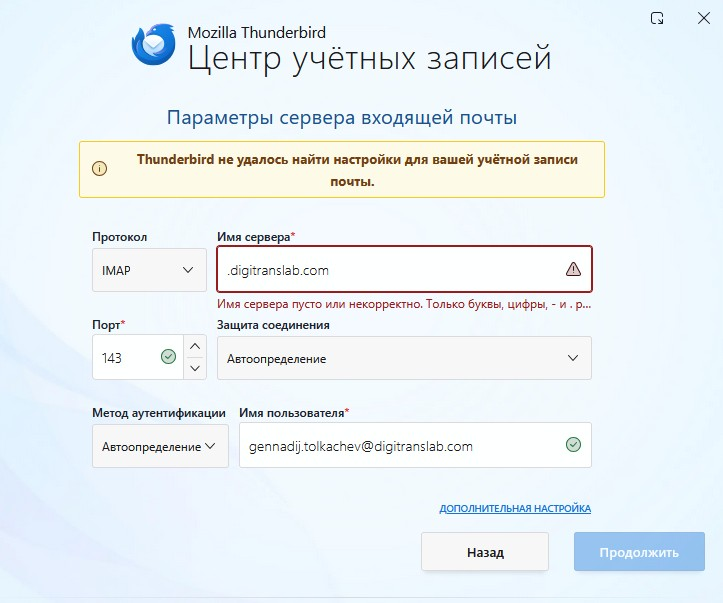
"Dear Support Team, I am trying to configure my email account (gennadij.tolkachev@digitranslab.com) in Mozilla Thunderbird, but I am encountering an issue. The automatic configuration fails with the message: "Thunderbird failed to find the settings for your email account." When I proceed to the manual setup screen, the Incoming Server field is pre-filled with ".digitranslab.com" (including the leading dot). The application rejects this, stating that the server name is empty or invalid (it says: "Server name is empty or incorrect. Only letters, numbers, - and . are allowed"). Could you please provide me with the correct manual server settings for our mail server? Specifically: Incoming Server (IMAP): Server hostname Port Connection security (SSL/TLS, STARTTLS, or None) Authentication method Outgoing Server (SMTP): Server hostname Port Connection security Authentication method Thank you for your assistance. Best regards, Gennadij Tolkachev"
"Dear Support Team, I am trying to configure my email account (gennadij.tolkachev@digitranslab.com) in Mozilla Thunderbird, but I am encountering an issue. The automatic configuration fails with the message: "Thunderbird failed to find the settings for your email account." When I proceed to the manual setup screen, the Incoming Server field is pre-filled with ".digitranslab.com" (including the leading dot). The application rejects this, stating that the server name is empty or invalid (it says: "Server name is empty or incorrect. Only letters, numbers, - and . are allowed"). Could you please provide me with the correct manual server settings for our mail server? Specifically: Incoming Server (IMAP): Server hostname Port Connection security (SSL/TLS, STARTTLS, or None) Authentication method Outgoing Server (SMTP): Server hostname Port Connection security Authentication method Thank you for your assistance. Best regards, Gennadij Tolkachev"
Attached screenshots

All Replies (1)

Thunderbird provides this information as a courtesy, but cannot know of every possible setup. I encourage you to check with your email provider for the specific settings for the account.

Ask a question

You must log in to your account to reply to posts. Please start a new question, if you do not have an account yet.