

This thread was archived.
Please ask a new question if you need help.

Solved
Archived
TB does not automatically download new messages email periodically even though "automatically download" is checked and set to 10mins

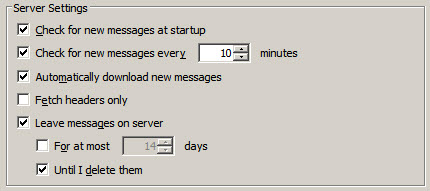
TB does not automatically download new messages email periodically even though "automatically download" is checked and set to 10mins. Picture of account's server settings is attached.
TB does not automatically download new messages email periodically even though "automatically download" is checked and set to 10mins. Picture of account's server settings is attached.
All Replies (1)

Chosen Solution
(For reference: this is about POP settings, not IMAP.)
Click the Advanced button below the settings above in the "Message Storage" section and review the When downloading mail from this account's server, use the following folder to store new messages: settings.
- Is Inbox for this account selected, and does the folder really/still exist? - If the second option (Inbox for different account) is selected, make sure the path is valid and the Include this server when getting new mail check box is ticked.