


Cannot receive messages

I just noticed that for the past few weeks one of my email addresses has not been downloading into TBird. System config details below.
  I looked at the instructions in "Cannot Receive Messages". My incoming email URL, email address, and password are all set correctly. I called the ISP and confirmed everything was OK at their end.
  I accessed the webmail folder for this email address successfully and can see all the missing emails still sitting there.
  I set up an email folder in MS Outlook using the same configuration as I use in TBird and directed it to download the messages for that email address. It did so without any difficulty.
  So there is some problem in TBird that is preventing it from downloading messages. It affects only this email address, as all my other email addresses (I have dozens) work fine in TBird. It is not a problem with my computer, the internet, or the email server as all those systems work fine with MSOutlook.
  Looking back at my email history I see this started about 26 August. No, I haven't changed anything in TBird in August or since then.
If anyone can shed any light on this and suggest a solution I would greatly appreciate it.
Application Basics
   Name: Thunderbird
   Version: 38.3.0
   User Agent: Mozilla/5.0 (Windows NT 6.3; WOW64; rv:38.0) Gecko/20100101 Thunderbird/38.3.0
   Profile Folder: Show Folder
             (Local drive)
   Application Build ID: 20150928051427
   Enabled Plugins: about:plugins
   Build Configuration: about:buildconfig
   Memory Use: about:memory
 Mail and News Accounts
   account1:
     INCOMING: account1, , (imap) imap.secureserver.net:993, SSL, passwordCleartext
     OUTGOING: smtp.1and1.com:587, alwaysSTARTTLS, passwordCleartext, true
   account2:
     INCOMING: account2, , (none) Local Folders, plain, passwordCleartext
   account3:
     INCOMING: account3, , (pop3) pop.1and1.com:110, alwaysSTARTTLS, passwordCleartext
     OUTGOING: teh.ca:587, alwaysSTARTTLS, passwordCleartext, true
     OUTGOING: teh.ca:587, alwaysSTARTTLS, passwordCleartext, false
   account4:
     INCOMING: account4, , (pop3) pop.1and1.com:995, SSL, passwordCleartext
     OUTGOING: smtp.1and1.com:587, alwaysSTARTTLS, passwordCleartext, true
     OUTGOING: smtp.1and1.com:587, alwaysSTARTTLS, passwordCleartext, false
     OUTGOING: smtp.1and1.com:587, alwaysSTARTTLS, passwordCleartext, false
   account5:
     INCOMING: account5, , (pop3) teh.ca:110, alwaysSTARTTLS, passwordCleartext
     OUTGOING: smtp.1and1.com:587, alwaysSTARTTLS, passwordCleartext, true
     OUTGOING: smtp.1and1.com:587, alwaysSTARTTLS, passwordCleartext, false
     OUTGOING: smtp.1and1.com:587, alwaysSTARTTLS, passwordCleartext, false
     OUTGOING: smtp.1and1.com:587, alwaysSTARTTLS, passwordCleartext, false
 Crash Reports
   http://crash-stats.mozilla.com/report/index/bp-173968e5-eaab-4f0f-a661-9ad6b2150709 (7/9/2015)
 Extensions
   Copy Sent to Current, 1.1.2, true, copysent2current@ggbs.de
   Enigmail, 1.8.2, true, {847b3a00-7ab1-11d4-8f02-006008948af5}
   Lightning, 4.0.3, true, {e2fda1a4-762b-4020-b5ad-a41df1933103}
   McAfee Anti-Spam Thunderbird Extension, 2.0, false, msktbird@mcafee.com
Important Modified Preferences
Name: Value
     browser.cache.disk.capacity: 358400
     browser.cache.disk.smart_size_cached_value: 358400
     browser.cache.disk.smart_size.first_run: false
     browser.cache.disk.smart_size.use_old_max: false
     extensions.lastAppVersion: 38.3.0
     font.internaluseonly.changed: true
     font.name.monospace.el: Consolas
     font.name.monospace.tr: Consolas
     font.name.monospace.x-baltic: Consolas
     font.name.monospace.x-central-euro: Consolas
     font.name.monospace.x-cyrillic: Consolas
     font.name.monospace.x-unicode: Consolas
     font.name.monospace.x-western: Consolas
     font.name.sans-serif.el: Calibri
     font.name.sans-serif.tr: Calibri
     font.name.sans-serif.x-baltic: Calibri
     font.name.sans-serif.x-central-euro: Calibri
     font.name.sans-serif.x-cyrillic: Calibri
     font.name.sans-serif.x-unicode: Calibri
     font.name.sans-serif.x-western: Calibri
     font.name.serif.el: Cambria
     font.name.serif.tr: Cambria
     font.name.serif.x-baltic: Cambria
     font.name.serif.x-central-euro: Cambria
     font.name.serif.x-cyrillic: Cambria
     font.name.serif.x-unicode: Cambria
     font.name.serif.x-western: Cambria
     font.size.fixed.el: 14
     font.size.fixed.tr: 14
     font.size.fixed.x-baltic: 14
     font.size.fixed.x-central-euro: 14
     font.size.fixed.x-cyrillic: 14
     font.size.fixed.x-unicode: 14
     font.size.fixed.x-western: 14
     font.size.variable.el: 17
     font.size.variable.tr: 17
     font.size.variable.x-baltic: 17
     font.size.variable.x-central-euro: 17
     font.size.variable.x-cyrillic: 17
     font.size.variable.x-unicode: 17
     font.size.variable.x-western: 17
     gfx.direct3d.last_used_feature_level_idx: 0
     mail.openMessageBehavior.version: 1
     mail.spotlight.firstRunDone: true
     mail.winsearch.firstRunDone: true
     mailnews.database.global.datastore.id: 951c5b8e-c51d-4808-a23e-d2579f838e6
     mailnews.database.global.views.conversation.columns: {"threadCol":{"visible":true,"ordinal":"1"},"flaggedCol":{"visible":true,"ordinal":"3"},"attachmentCol":{"visible":false…
     network.cookie.lifetimePolicy: 2
     network.cookie.prefsMigrated: true
     network.predictor.cleaned-up: true
     places.database.lastMaintenance: 1443661006
     places.history.expiration.transient_current_max_pages: 104858
     plugin.importedState: true
     plugin.state.silverlight: 0
Chosen solution
Right. Somehow that setting must have gotten changed. It's supposed to be None. Problem solved. Thank you very much!
Read this answer in context 👍 0All Replies (8)

Which of the accounts listed in the Troubleshooting Information is the one with the problem?
Is there any reason you have defined multiple SMTP servers for some accounts? This isn't related to the receiving problem though.
It's the teh.ca account that won't download messages (account 3).
re: multiple SMTP servers Not sure how all those got in there, but sometimes when I'm on the road I find that an outgoing SMTP server won't work from my location and I have to use one of the other services SMTP servers to get messages out.
Thanks. Any help greatly appreciated.
Ted
Account 3 is pop.1and1.com, not teh.ca.
Modified by christ1
Sorry, I guess it's account 5 then, where teh.ca is the incoming email.
Thanks, Ted
Please check with teh.ca about the correct server settings and post them here. Or provide a link to their support site. I haven't found one.
Uniserve is the host for the teh.ca domain. They say, "The settings for pop incoming is : host3.uniservehosting.com on port 110 For outgoing : host3.uniservehosting.com port 465 with SSL enabled."
I have tried using "host3.uniservehosting.com" instead of teh.ca as the Server Name in Server Settings, but it makes no difference. Attached is a screenshot of my Server Settings window.
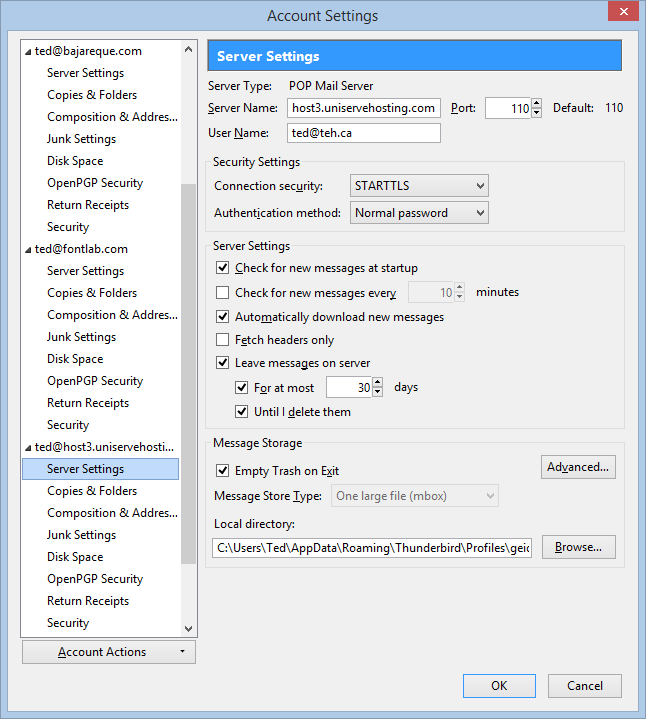
You've set 'Connection Security' to 'STARTTLS'. Is this what they require? Check with them again.
Chosen Solution
Right. Somehow that setting must have gotten changed. It's supposed to be None. Problem solved. Thank you very much!