


WHY CAN'T I JUST CLOSE 1 EMAIL INSTEAD OF CLOSING THE E MAIL AND THE WHOLE PROGRAM?

OK! I HAVE AN E-MAIL OPEN. I HAVE READ IT AND I WANT TO CLOSE IT. I LEFT CLICK ON THE X OF THE E MAIL. NOT ONLY DOES THE E-MAIL CLOSE, BUT THE WHOLE THUNDERBIRD PROGRAM CLOSES TOO. ALL I WANT IS JUST TO CLOSE THE E MAIL -- NOTHING ELSE. HOW DO I DO THAT?
All Replies (11)

Hello Squeaky, could I ask you what view you have Thunderbird in, is it 'classsic view' or one of the others? There are three of them. Go into View then Layout. Regards
I AM IN CLASSIC VIEW.
Do you open messages in the "preview" pane, i.e. below the Inbox, or in their own window/tab by double clicking them?
If in a tab, how many of these X's do you see? You might be clicking the wrong one.
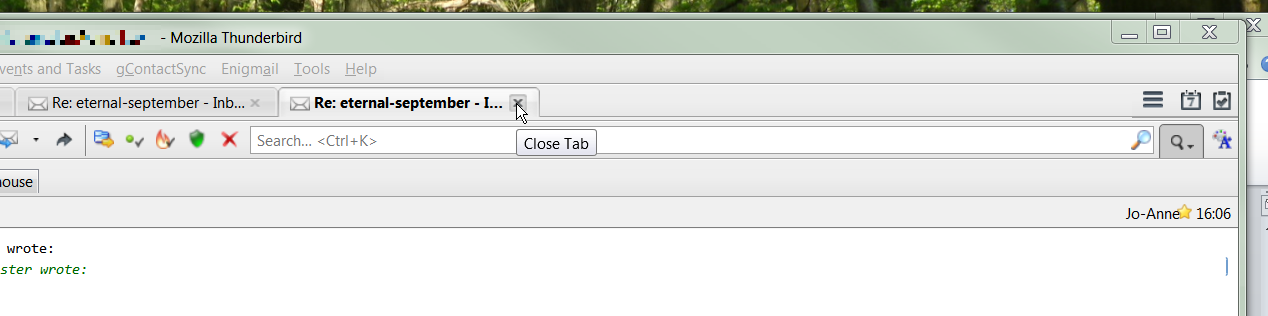
Modified by Zenos
I OPEN THEM BY DOUBLE CLICKING ON THEM AND CLOSE THEM BY HITTING THE X.
"The X"? Well, using the method you describe, I see one X per message, plus one to close Thunderbird itself.
Look at the picture attached to my post. The "close tab" balloon indicates the correct X to close the active message tab.
Modified by Zenos
SORRY I DON'T SEE A PICTURE! YES, I CLICK ON THE X TO CLOSE THE E MAIL. IT SHOULDN'T HOWEVER CLOSE THE E MAIL AND THUNDERBIRD SIMULTANEOUSLY -- JUST THE OPEN E MAIL.
Sigh. There is a picture in my posting of 4:24 PM earlier today. You needed to click on it to open it to full size.
https://support.cdn.mozilla.net/media/uploads/images/2015-03-16-09-24-01-f851bd.png

WHEN I DOUBLE CLICK ON AN E MAIL IT AUTOMATICALLY OPEN FULL SIZE THE X IS IN THE TOP RIGHT HAND CORNER. NOT IN THE MIDDLE LIKE YOU SHOW IT.
And when I click on that top-right X, it closes just the message window and leaves Thunderbird running. I can't tell what you're doing differently.
You could close a message window with the Escape key, usually at top left of your keyboard. Or ctrl+w, or alt+F4. But the X ought to work too. Or you could set it to open in a tab, with its own close button as in my picture (but tabs have also confused a lot of people who go for the X at top right and so close the program.)
Or you could do as I do and read your messages in the bottom pane. But I'm guessing from your choice of block capitals that you have eyesight issues and need things as big as possible.
Modified by Zenos
I DON'T THINK THERE IS AN ANSWER TO THIS. THANKS FOR TRYING!
I think you need to post a screenshot, please see How do I create a screenshot of my problem?
Once you've done this, attach the saved screenshot file to your forum post by clicking the Browse... button below the Post your reply box. This will help us to visualize the problem.
Thank you!