


Suddenly, my html signature font is displaying wrong

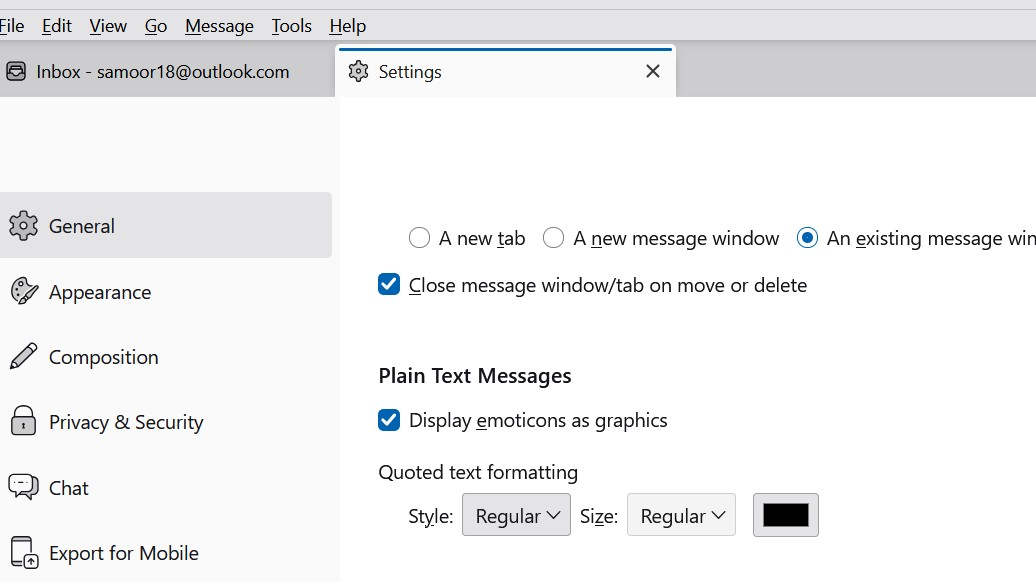
I use HTML as my signature. It has been working just find, but lately when people reply to me, their messages were coming in blue text. So today I changed the: Settings > General > Plain Text Messages > Quoted text formatting from blue colour to black (I have no idea how that was set to blue in the first place). that is all I did. Image attached of the change I made.
In any case, after that, when I tried to send a new email my HTML signature no longer displays the correct font (Pristina) but shows only variable text. The HTML file is not corrupt, it still looks fine in the actual file I saved, but, Thunderbird is changing it somehow. Even when I look back at sent files, Thunderbird is showing me the variable text and not Pristina.
Any assistance would be much appreciated. With thanks, NM
การตอบกลับทั้งหมด (23)
The 'support' you are getting is from me. And it's free. But, I will see if I can find a super guru who may have ideas. Any future suggestions from me will be a waste. I cannot duplicate your issue and there may be others who can help. but i do offer one item: send a personal note to yourself, not one with the business, just a personal note that includes the sig we worked on. do you have any addons? If so, try clicking help>troublehootingmode to ensure no addon interference.
Thanks again David, you are super!
Well, I sent request to one of the smartest people I know on the forum. I do hope he has time to review this. I am stumbling. :) But thank you for your kind words. And do send that private message with no addons. It may open a window. Regards,