


Massive CPU, GPU, and memory usage on basic TB install on OSX 27.0

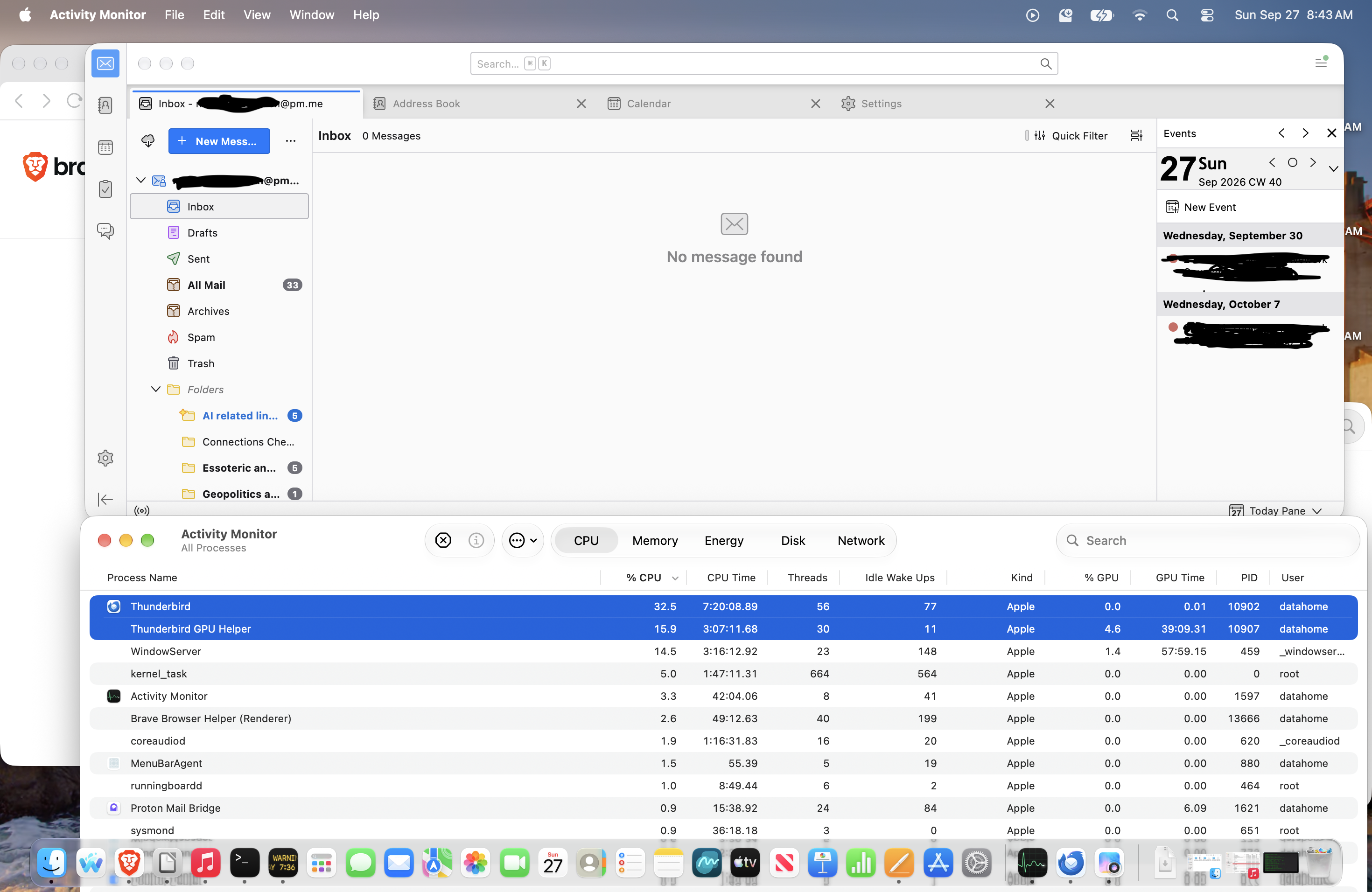
I have a completely vanilla install of TB fully up to date as of this writing [it is version = 156.0.1 (aarch64) and I checked for updates], no extensions, no proxy, on a new OSX 27.0 (Golden Gate) computer and even when idling it is using substantial resources. The only thing even remotely non-basic is their is the Proton Mail Bridge to connect to Proton Mail for one of the linked email accounts, but that is its own little program with its own threads and takes almost no system resources even when sending or receiving mail (which is not happening currently.) Look at the attached screen shot.
In the screen shot I have left Thunderbird to idle for about an hour. No new mail in that time and other then clicking on or off the window to bring it to the fore I have not interacted with the program at all myself. Meanwhile Thunderbird and its Thunderbird GPU Helper are using substantial amounts of the CPU and GPU, have a combine total of 86 threads (more then any two other things running except the kernal tasks) and are hogging ram (not depicted).
Meanwhile among a few other applications (Apple Music, OfficeLibre, etc...) I also have Brave Browser opened in the background running with two windows and a total of 8 tabs wherein Brave is actively downloading GB of data from MEGA as well as performing other admittedly lighter tasks. Even when doing all this, Brave barely registers on computer resources compared to Thunderbird and Thunderbird GPU Helper when they are just idling.
Is this all proton mail's fault with the Proton Mail Bridge? If not is there anything I can do to quell the hunger for computer resources of this voracious beast of an email client that is TB and uses resources as if it were a video game even when idling?
การตอบกลับทั้งหมด (2)
What is showing in status bar at the very bottom? Does behavior change if calendars are disabled?
Status bar was empty during this time. It is visible in the original attached image just above the Activity Monitor window (almost the middle of the screen shot.) The top of the Activity Monitor window only clips a few pixels off the bottom of the status bar in the image leaving messages (if there were any) still visible.
I have since restarted everything. For the moment TB appears to be behaving. If the problem starts again I will check check the status bar again (though no luck last time) and play around with the calendars as you suggest, and then get back to you.
Thanks for getting back to me and giving me some suggestions to start.