


Not prompted/notified for Thunderbird Update
I had logged this issue in early 2025 but it has never been resolved and still exists.
I received a reply today, Tuesday 7th July, from Wayne Mery, who said "If you are still having problems when using a newer version, please post a new question and we'll take a new look at it.". as the original post has been archived.
So, here are the details:
"I am currently running Thunderbird 152.0.1 (64-bit) and I don't get an automatic prompt for updates and haven't been getting them since I updated to Supernova and now Nebula.
I have the settings set to Check for updates, but let me choose whether to install them, which is the setting I have always had and I used to get automatic prompts for updates with a window opening to show the details of the update as I get in Firefox.
Can someone tell me how to get these automatic updates back."
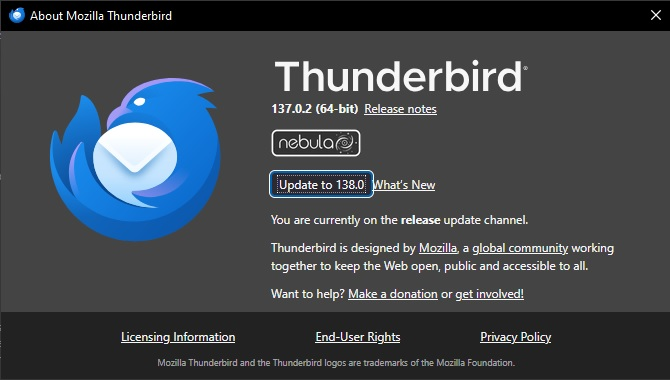
I have attached a screenshot of the original version.
Thanks.
เปลี่ยนแปลงโดย Wayne Mery เมื่อ
การตอบกลับทั้งหมด (2)
Thanks for posting. I see that you previously posted https://support.mozilla.org/en-US/questions/1509383 for version 137.
There are some bug reports: https://mzl.la/3SOlYu3. Do any look like a good fit?
Many thanks for your quick reply.
Yes, one of the bug reports is a perfect fit, Bug 1883637, Thunderbird fails to offer updates when available.
I get updates notified to me by Firefox okay, it was Thunderbird after an update that stopped doing it.
The settings for Updates are okay, Check for updates, but let me choose whether to install them is selected and always has been.
Hope this is helpful.
Thanks.