


Changed Thunderbird from POP to IMAP

I created a user profile for IMAP and all was OK....Until I deleted the profile for POP and I lost all e-mail folders that I didn't move to IMAP. My PC is running Linux Mint. How do I get my lost e-mails?
การตอบกลับทั้งหมด (5)

Do not delete your POP account until you are sure. To get your lost emails, you need
1. restore your POP profile if you still have it https://support.mozilla.org/en-US/kb/profiles-where-thunderbird-stores-user-data#w_backing-up-a-profile
or 2. You have set "Leave messages on server" for your POP account, then you should still have the emails on your server.
I created a user profile for IMAP and all was OK....Until I deleted the profile for POP and I lost all e-mail folders that I didn't move to IMAP.
Did you really create two Thunderbird profiles, one profile with the POP account and then a second profile with the IMAP account? Or did you have one profile with the POP account and then set up an IMAP account for the same email address, in order to copy messages from the POP to the IMAP account? Normally, when you delete a POP account in Account Settings, Thunderbird prompts to remove only account information but not the message data. We don't know whether you checked "Remove message data" and probably you don't remember.
To verify if your message data are still stored in your Thunderbird profile go to >> Help > Troubleshooting Information > Profile Folder > Open Folder: in the profile folder go to Mail and verify its contents. Does it contain an account folder something like "pop.xxx.xx" and does this folder contain mailbox files such as Inbox, Sent, Drafts, Archives, Trash?
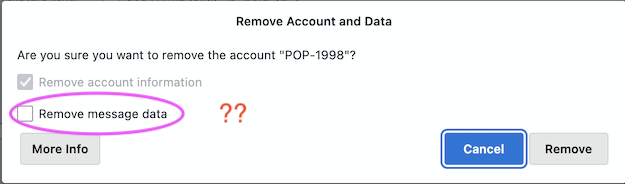
Please forgive me as I have confused profiles with account. When I deleted the POP account I chose to remove ONLY account information. And I am pretty sure I did not check "Remove message data"! I have tried the "Help > Troubleshooting Information" "Profile Directory" "Open directory (local drive)" I then went to Mail and indeed this folder contains "pop.mail.com" and in there seems to be everything I have lost. This seems to be VERY GOOD NEWS!! Now, how do I get this stuff back?
Good. Just backup it first.
In the help https://support.mozilla.org/en-US/kb/profiles-where-thunderbird-stores-user-data#w_backing-up-a-profile
I think you can try to copy the folder to your profile (you need create a new POP profile) Restoring a profile backup
You can restore your data using Thunderbird's import tool, or the steps below.
   Shut down Thunderbird.
   If your existing profile folder and profile backup folder have the same name, simply replace the existing profile folder with the profile backup, then start Thunderbird.
   Important: The profile folder names must match exactly for this to work, including the random string of 8 characters. If the names do not match or if you are restoring a backup to a different location, follow the steps below. (see above link)
KenWhitney said
I then went to Mail and indeed this folder contains "pop.mail.com" and in there seems to be everything I have lost. This seems to be VERY GOOD NEWS!! Now, how do I get this stuff back?
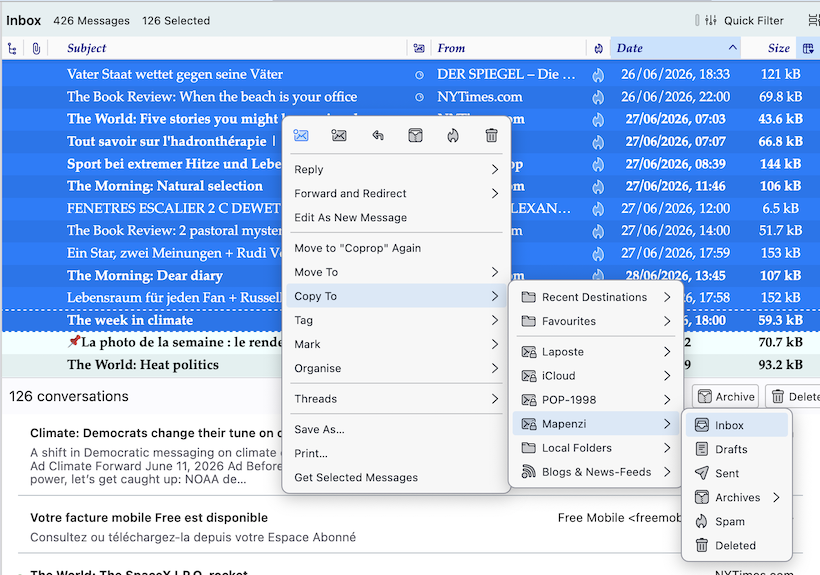
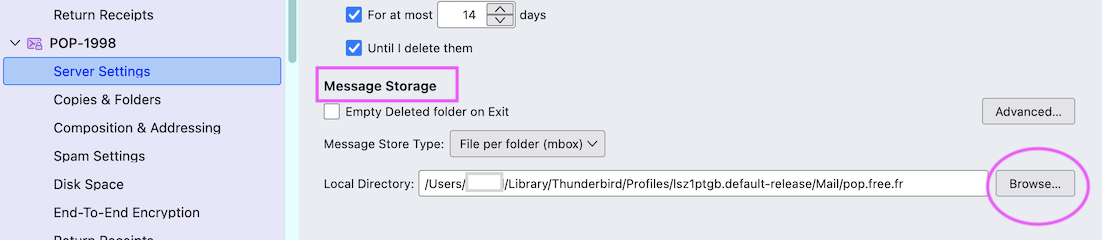
In fact, this is very good news since the messages of the POP account are still saved in the profile folder. To retrieve those messages I would recommend a different approach: • recreate this account again still as a POP account • after successfully recreating the POP account go to Account Settings > new pop account > Server Settings > Message Storage > Local Directory and click on the "Browse" button (see image) • in the following window navigate to your profile folder > Mail > select "pop.mail.com" and click the "Open" button • Thunderbird will prompt for a restart after which you should ses your old POP account again in the folder pane with all its folders and messages • select bunches of 100 to 200 messages in the pop folders and copy them to the respective folders in the IMAP accounts (image) If the transfer from a POP folder to an IMAP folder is fast, you may try to copy bigger bunches each time
เปลี่ยนแปลงโดย Mapenzi เมื่อ