


Windows 10 reached EOS (end of support) on October 14, 2025. If you are on Windows 10, see this article.

ค้นหาฝ่ายสนับสนุน

Avoid support scams. We will never ask you to call or text a phone number or share personal information. Please report suspicious activity using the “Report Abuse” option.

เรียนรู้เพิ่มเติม

Unhable to login, Thunderbird in Windows

  • 1 การตอบกลับ
  • 0 คนมีปัญหานี้
  • 36 ครั้งที่ดู
  • ตอบกลับล่าสุดโดย pwrgreg007
  • แก้ไขปัญหาแล้ว

To install a Windows 10 update (I'm on extended support) I told it to update & shutdown. I fired it up this morning and Thunderbird is asking for credentials. It usually just runs & downloads emails. I enter my password, then a code from authenticator app. It shows the page below in an embedded browser window that has a checkbox and an "Agree" button. I check the box but the Agree button is still disabled. Dead end. I cannot connect & I'm stuck.
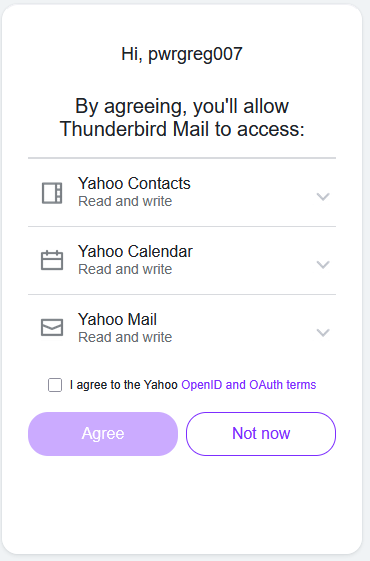
To install a Windows 10 update (I'm on extended support) I told it to update & shutdown. I fired it up this morning and Thunderbird is asking for credentials. It usually just runs & downloads emails. I enter my password, then a code from authenticator app. It shows the page below in an embedded browser window that has a checkbox and an "Agree" button. I check the box but the Agree button is still disabled. Dead end. I cannot connect & I'm stuck.
ภาพหน้าจอที่แนบมา

วิธีแก้ปัญหาที่เลือก

I'm not sure what was happening, but it is working now. I restarted Thunderbird, repeated the process, and the Agree button WAS enabled after about a one-second delay after checking the "I agree" checkbox.

อ่านคำตอบนี้ในบริบท 👍 0

การตอบกลับทั้งหมด (1)

วิธีแก้ปัญหาที่เลือก

I'm not sure what was happening, but it is working now. I restarted Thunderbird, repeated the process, and the Agree button WAS enabled after about a one-second delay after checking the "I agree" checkbox.

ถามคำถาม

You must log in to your account to reply to posts. Please start a new question, if you do not have an account yet.