


Present Spam folder contents from provider side

TB 140.7.0 32bit, Windows10 64bit
My email provider implements black-box spam processing, with deemed spam redirected into a "Spam" folder at the server end which by default is flushed every 60 days.
To view all the incoming mail, I now not only need to view the account Inbox as TB presents it, I also need to log in to the provider's Web interface to inspect the account's Spam folder. I'd rather view this Spam folder through the TB interface to avoid extra logins.
So I
(1) Created a Spam subfolder under Local Folders using the TB interface. The Properties function reports its path as mailbox://nobody@Local Folders/Spam (the Inbox path is reported as mailbox://nobody@Local Folders/Inbox). These paths are read-only as presented by the Properties function.
(2) Used the Config Editor to set mail.server.default.check_all_folders_for_new to TRUE.
(3) Restarted TB, verified that check_all_folders_for_new was indeed TRUE.
However, while the account's Spam folder was known to contain 2 entries at the server side, the end-user Spam folder was not populated, whether by way of TB restart or manual invocation of the Get All New Messages function.
Any ideas ?
Thanks.
วิธีแก้ปัญหาที่เลือก
<< Was not being able to receive messages via IMAP your only connection problem? Send and receive are both working in POP? >>
Yes, that was the post-reconfig problem. All 3 accounts started life as POP send+receive and worked merrily until the provider's IMAP rollout. Reconfiguration only worked for IMAP transmission, not reception, so I reverted the receive configs so that now all 3 accounts do POP for receive and stayed with IMAP for send.
I expected the provider to have planned shutting down POP entirely and inquired about that but never got a response. At this point POP reception is still working.
Anyway, migration looks to be the way forward and as far as I'm concerned this call can be declared solved.
Thanks for your time bro.
อ่านคำตอบนี้ในบริบท 👍 0การตอบกลับทั้งหมด (6)

The server folder and the folder that you created are not the same. All you should have to do is subscribe to the server folder. Right click on the account name in the folder pane, select "Subscribe", and check the box for the spam folder.
Ah, one pesky detail: the account in question is a POP job, not IMAP. So the Subscribe feature isn't offered.
Last November my provider did an IMAP rollout, bottom line was that while I could still send using IMAP, I couldn't receive with it, so the reception side stayed with POP settings. So I guess I'll likely need to revisit that.
One thing though: is the check_all_folders_for_new setting still necessary ?
H Br said
Ah, one pesky detail: the account in question is a POP job, not IMAP. So the Subscribe feature isn't offered. Last November my provider did an IMAP rollout, bottom line was that while I could still send using IMAP, I couldn't receive with it, so the reception side stayed with POP settings. So I guess I'll likely need to revisit that. One thing though: is the check_all_folders_for_new setting still necessary ?
Are you using an IMAP account and a POP account in Thunderbird at the same time. I assume that that can cause problems.
If you are using an IMAP account in addition to the POP account, then you can subscribe to the spam folder in that account and see if the missing messages are there.
I do not use POP and am not very knowledgeable about it. I believe that a POP account cannot access a spam folder on the server. You have to use IMAP.
I do not know about check_all_folders_for_new. I control that function through folder properties.
You should probably solve the connection problem that prevents receiving messages in your IMAP account, then delete the POP account.
Please report your incoming server settings for the IMAP account. Incoming server settings are in account settings > server settings.
We will need this information:
server name port connection security method authentication method username: just report if whether or not you are using your full e-mail address
There are four accounts. One is a gmail job, it was created IMAP for send+receive and runs perfectly.
The other three were created POP3 for send+receive, but come last November my provider rolled out the IMAP protocol. A simple config. change was enough to get these three to _send_ okay, but _receive_ was a different story. I now reckon I got a little too cute, thinking a simple config. change would do the job, but in the end I just reverted the incoming config. for these accounts back to POP3 and all's been fine since.
Subseuently all that I've found regarding POP-to-IMAP conversions have spoken of actual _migration_, i.e. create the new IMAP account, transfer the mail contents from the POP account, then delete the POP account. I guess that's what I'll have to do.
As far as the account setups go, here's the relevant excerpt from the TB Troubleshooting Information function (I thought I could attach the entire .txt file, but it appears this page insists on an _image_ upload):
 Mail and News Accounts
   account1:
     INCOMING: account1, , (none) Local Folders, plain, passwordCleartext
   account2:
     INCOMING: account2, , (pop3) mail.aapt.net.au:110, plain, passwordCleartext
     OUTGOING: , smtp.themessagingco.com.au:465, SSL, passwordCleartext, true
   account3:
     INCOMING: account3, , (pop3) mail.aapt.net.au:110, plain, passwordCleartext
     OUTGOING: , smtp.themessagingco.com.au:465, SSL, passwordCleartext, true
   account5:
     INCOMING: account5, , (pop3) mail.aapt.net.au:110, plain, passwordCleartext
     OUTGOING: , smtp.themessagingco.com.au:465, SSL, passwordCleartext, true
   account6:
     INCOMING: account6, , (imap) imap.gmail.com:993, SSL, OAuth2
     OUTGOING: , smtp.gmail.com:465, SSL, OAuth2, true
Accounts 2, 3, 5 are the POP3 receivers, #6 is the Gmail IMAP job.
Thanks for the information. I was most interested in the IMAP settings. You must have switched back to only POP at the Messaging Company.
Was not being able to receive messages via IMAP your only connection problem? Send and receive are both working in POP?
Instructions for switching to IMAP, which you may have found already: https://support.mozilla.org/en-US/kb/switch-pop-imap-account
Yes, migration, not just changing settings. I expect that your spam folder will work fine in IMAP.
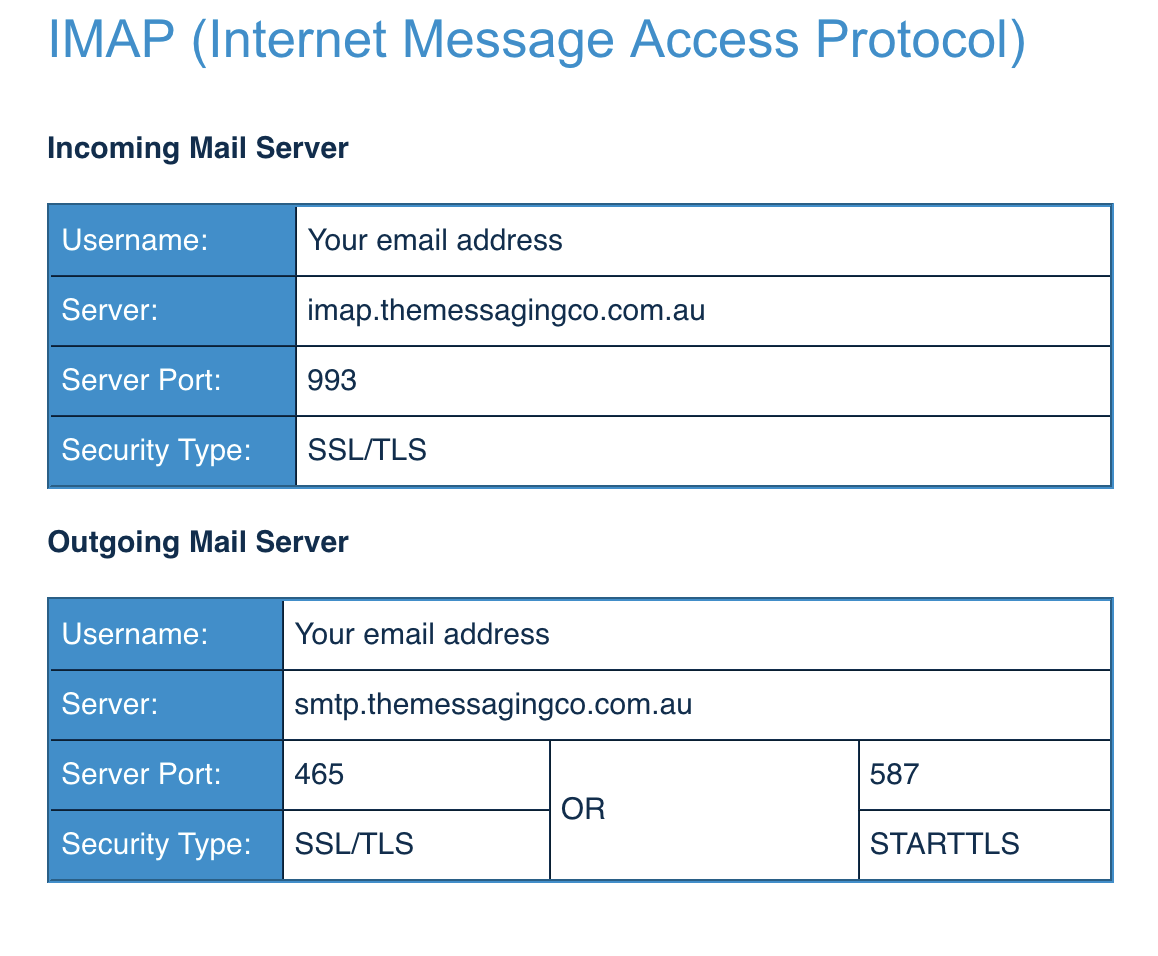
The Messaging Company's IMAP settings are attached.
วิธีแก้ปัญหาที่เลือก
<< Was not being able to receive messages via IMAP your only connection problem? Send and receive are both working in POP? >>
Yes, that was the post-reconfig problem. All 3 accounts started life as POP send+receive and worked merrily until the provider's IMAP rollout. Reconfiguration only worked for IMAP transmission, not reception, so I reverted the receive configs so that now all 3 accounts do POP for receive and stayed with IMAP for send.
I expected the provider to have planned shutting down POP entirely and inquired about that but never got a response. At this point POP reception is still working.
Anyway, migration looks to be the way forward and as far as I'm concerned this call can be declared solved.
Thanks for your time bro.