trash folder
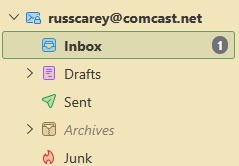
My Trash Folder has disappered, no longer appearing under my email account. I can access only: Inbox, Drafts, Sent, Archives, and Junk. When I try to create a Trash Folder under my email account I receive a message that I already have that folder. I uninstalled, then reinstalled, Thunderbird on the possibility that the program was somehow corrupted, but I still cannot see, nor access, a Trash Folder.
วิธีแก้ปัญหาที่เลือก
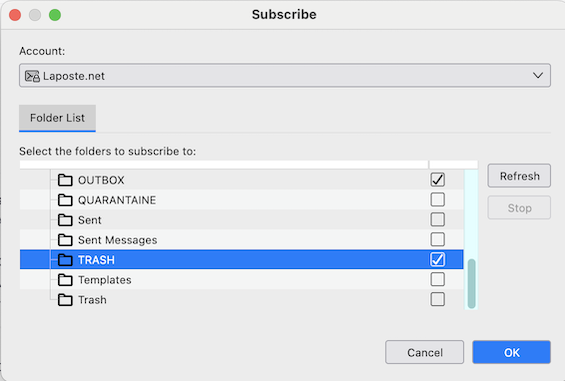
If it is an IMAP account R-click on the account name > Subscribe .... which opens the folder list. In the folder list check "Trash" (or "Trash") and click OK
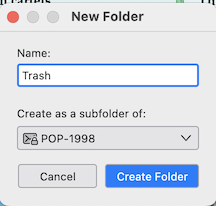
If it is a POP account R-click on the account name and choose "New Folder". In the dialogue window type Trash as the folder name, verify that the new folder will be a subfolder of your account and click "Create Folder". A folder "Trash" with the typical icon of a trash bin should be created immediately as a folder in the POP account.
อ่านคำตอบนี้ในบริบท 👍 0การตอบกลับทั้งหมด (1)
วิธีแก้ปัญหาที่เลือก
If it is an IMAP account R-click on the account name > Subscribe .... which opens the folder list. In the folder list check "Trash" (or "Trash") and click OK
If it is a POP account R-click on the account name and choose "New Folder". In the dialogue window type Trash as the folder name, verify that the new folder will be a subfolder of your account and click "Create Folder". A folder "Trash" with the typical icon of a trash bin should be created immediately as a folder in the POP account.