


Ho to access "Folder Modes" in Thunderbird 140.1.1esr (32-bit) for Windows 10

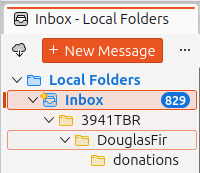
I cannot find how to set "Folder Modes" in Thunderbird 140.1.1esr (32-bit) for Windows 10. The "Get Messages" icon and "New Message" button have vanished on updating Thunderbird. I would like to set up the new version as shown in the attached image.
I cannot find how to set "Folder Modes" in Thunderbird 140.1.1esr (32-bit) for Windows 10. The "Get Messages" icon and "New Message" button have vanished on updating Thunderbird. I would like to set up the new version as shown in the attached image.
วิธีแก้ปัญหาที่เลือก
Try TB menu > View > Folders > Folder Pane Header.
อ่านคำตอบนี้ในบริบท 👍 1การตอบกลับทั้งหมด (1)

วิธีแก้ปัญหาที่เลือก
Try TB menu > View > Folders > Folder Pane Header.