

หัวข้อนี้ถูกเก็บถาวรแล้ว
โปรดถามคำถามใหม่หากคุณต้องการความช่วยเหลือ

เก็บถาวรแล้ว
Assistance with managing extensions on Mac OS

Hello, I am trying to manage extensions in my organization. What would be the best way to block all extensions by default and allow only certain specific extensions?
I am following the Mac OS Extension Settings Policy and adding this to a configuration profile, but I am not sure how to manipulate it to suit my needs.
What would be the best way to go about this, and what would the plist file look like?
Thanks!
Hello, I am trying to manage extensions in my organization.
What would be the best way to block all extensions by default and allow only certain specific extensions?
I am following the Mac OS Extension Settings Policy and adding this to a configuration profile, but I am not sure how to manipulate it to suit my needs.
What would be the best way to go about this, and what would the plist file look like?
Thanks!
การตอบกลับทั้งหมด (1)

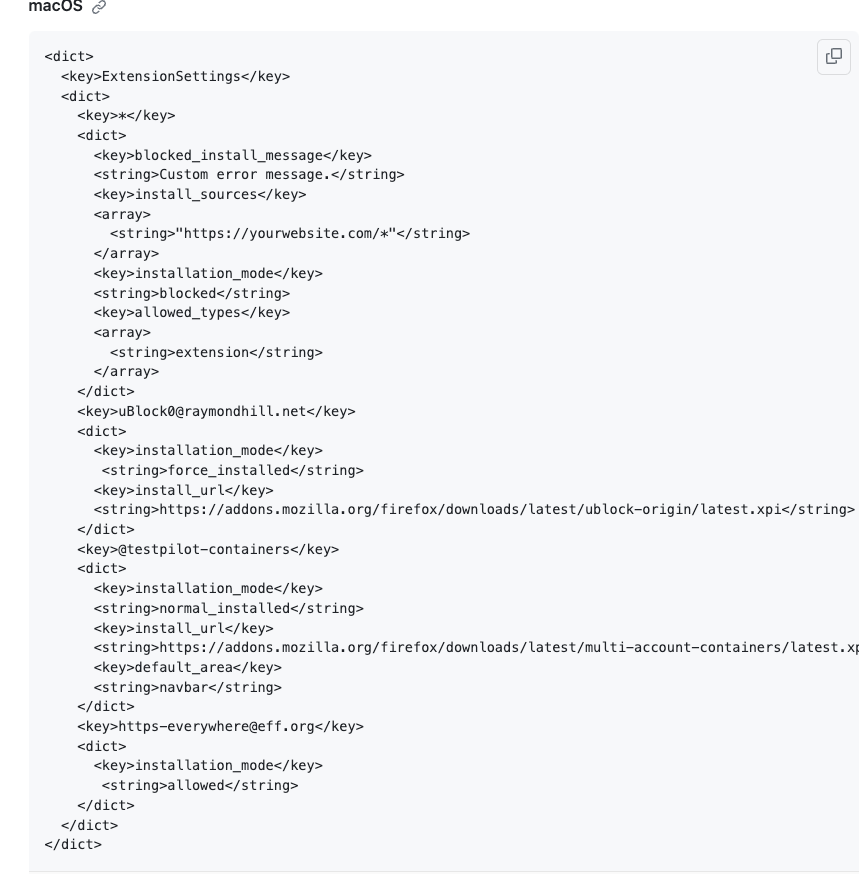
IT would look like this:
<dict>
 <key>ExtensionSettings</key>
 <dict>
   <key>*</key>
   <dict>
     <key>installation_mode</key>
     <string>blocked</string>
   </dict>
   <key>uBlock0@raymondhill.net</key>
   <dict>
     <key>installation_mode</key>
      <string>allowed</string>
   </dict>
   <key>https-everywhere@eff.org</key>
   <dict>
     <key>installation_mode</key>
      <string>allowed</string>
   </dict>
 </dict>
</dict>
You would block everything and then just add any extension you want to allow the user to install.