


Confusion of headers/etc. on some emails after upgrade to 115.2.2
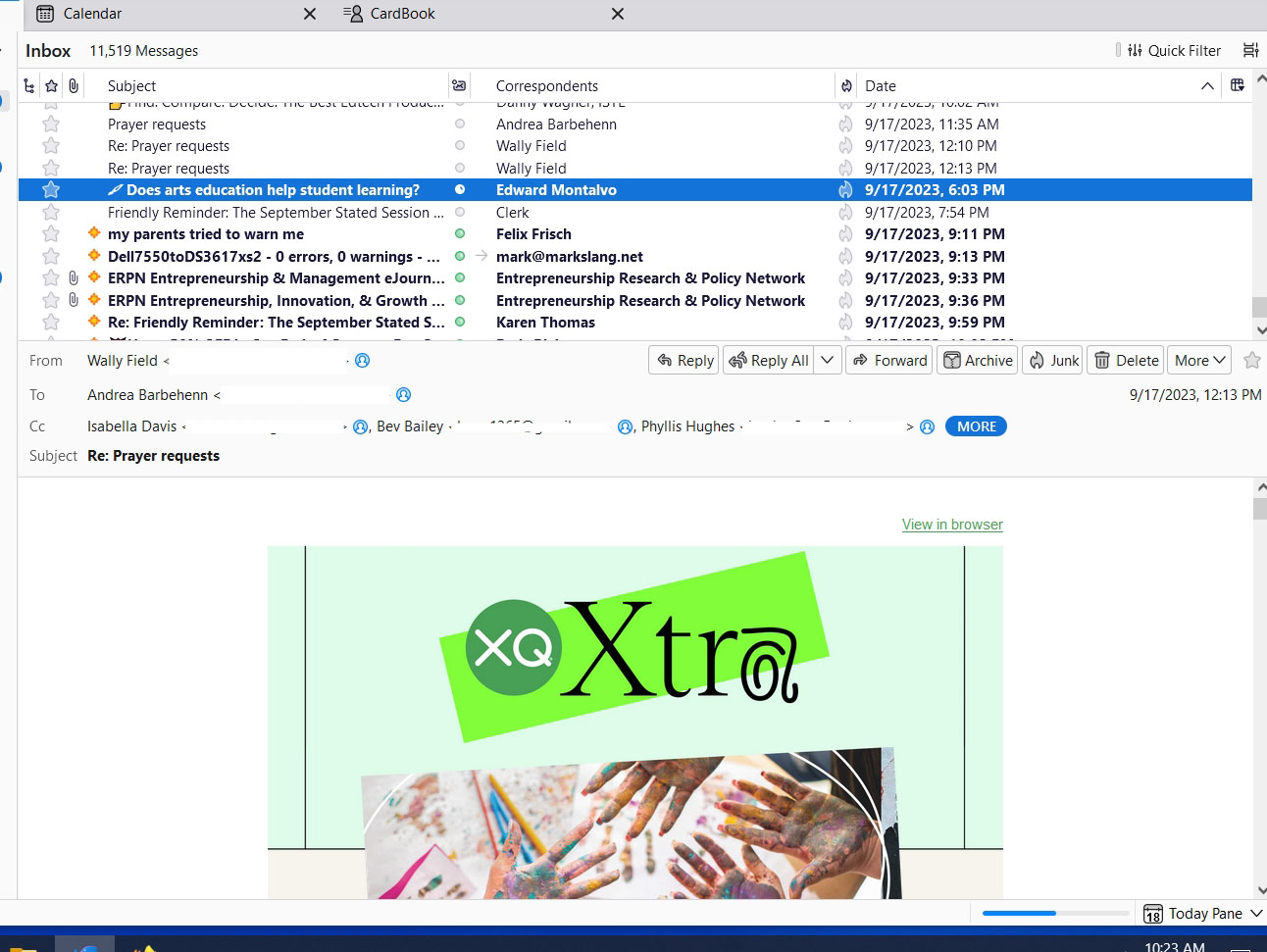
I recently upgraded from the 102 series to the new 115.2.2. I did not use the automatic upgrade. I downloaded the code from the website and manually installed it over my old version. For the most part, things are working. My 4 IMAP accounts all appeared in the new version pretty much as they were before. I decided to keep using the new version. However, I later discovered one annoying issue. For some emails, when I click on them to read them, the line in the listing above does not change from bold to standard text, indicating the email has been read. Further, the header part of the email (containing the From, To, etc. and options like Reply and Delete) either does not appear at all, or I see the header from the last email that I read.
I have attached a screen shot. Notice that in the screenshot I am reading a newsletter from Edward Montalvo, XQ Extra. The email shows in the viewing pane. However, the header that shows is from the prior email in the list, a personal email from Wally Field. I am not sure what would happen if I select something like Delete at this point.
This only happens on certain emails. Most of them work fine. To date, it has always occurred on some kind of newsletter or advertising type email. I am seeing that many people are having more serious issues with the new version. However, any advice is appreciated. Perhaps this will provide some clues as to some underlying issues in the indexing or message processing that may be behind other problems, also.
การตอบกลับทั้งหมด (2)
Here is an update. I have begun to notice this issue happening a lot more often. However, it seems to correct. That is, I will go to a new message. The message body appears almost immediately. However, the header is left over from the last email. However, usually, if I stay on that message long enough, the header will update to that of the current email. It is taking 15 seconds or more on some emails. Some update within a second. That really gets in the way of scanning through a large number of emails. I did repair the folder, but it did not help. The folder is pretty large, over 2.5GB. However, that has not caused any issues for many many years.
This was starting to happen regularly today. On Friday, when I made the upgrade, everything seemed fine. It also seemed fine on Saturday except for a very few exceptions. Today, I get the delayed headers regularly. While they usually do update if I wait long enough, this is really impacting my productivity. So I just went back to 102.15.1 using a copy of my profile that I saved right before I made the upgrade and a saved version of the earlier code. Perhaps there is some kind of issue with scratch space cleanup or something like that which causes this issue to get worse over time. I will wait for a newer version of 115 before I try the upgrade again.
I think it is great the TB team is making the effort to upgrade the code base and set the program up for the future. I guess it is just a bit more complicated than people thought.
By the way, I did have to upgrade two of my plugins, xpunge and Cardbook, when I made the 115 upgrade. TB did not warn me that either was incompatible, but I checked them to be sure when I did the prior upgrade. Perhaps you need to spread the word more widely to check for new plugins when upgrading.