


Windows 10 reached EOS (end of support) on October 14, 2025. If you are on Windows 10, see this article.

ค้นหาฝ่ายสนับสนุน

Avoid support scams. We will never ask you to call or text a phone number or share personal information. Please report suspicious activity using the “Report Abuse” option.

เรียนรู้เพิ่มเติม

Opening attachments from inbox

  • 2 การตอบกลับ
  • 1 คนมีปัญหานี้
  • 135 ครั้งที่ดู
  • ตอบกลับล่าสุดโดย Jan Starka
  • เก็บถาวรแล้ว

Hello,

when I click on an e-mail attachment, a windows always pops-up that asks me what to do. I have "Do this automatically for files like this from now on" checked but the pop-up appears every time. If I select "Save file" than next time the dialog window for saving pops-up automatically. Only PDF files are opened without asking. The error started immediatelly after updating to Thunderbird 91.

In compose message window a double click on the attached file works fine.

I tried to delete the associations in preference and create them new but with the same result. As I open a lot of attachments, this bug is really annoying me. How can I resolve it?
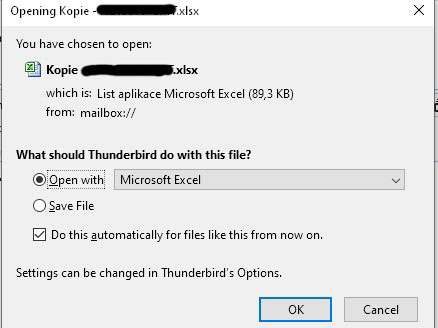
Hello, when I click on an e-mail attachment, a windows always pops-up that asks me what to do. I have "Do this automatically for files like this from now on" checked but the pop-up appears every time. If I select "Save file" than next time the dialog window for saving pops-up automatically. Only PDF files are opened without asking. The error started immediatelly after updating to Thunderbird 91. In compose message window a double click on the attached file works fine. I tried to delete the associations in preference and create them new but with the same result. As I open a lot of attachments, this bug is really annoying me. How can I resolve it?
ภาพหน้าจอที่แนบมา

การตอบกลับทั้งหมด (2)

Thank you, I could not find the previous posts. I will see if the problem will be corrected with the next update, otherwise I will either revert to an older version or try Betterbird