


Print PDF
Since upgrading to a newer version of FF, I find that I am unable to save to PDF like I've been doing so for years. The MacOS User Guide says to choose File > Print then Click the PDF pop up menu and choose Save as PDF.
Well, this open is no longer showing up in FF version 86.0. Can someone tell me how to get it back? Thanks.
การตอบกลับทั้งหมด (3)
วิธีแก้ปัญหาที่เลือก
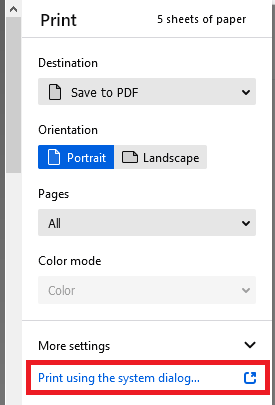
I think you could try either in the new print experience:
(1) Try changing to the Save as PDF printer on the overlay
(2) Click the link in the lower right to use the system dialog
This screenshot shows the Destination changed to Save as PDF and has a box around the link to use the system dialog instead:

Does either of those work for you?

I'd be particularly interested to know if option #1 above doesn't meet your needs.
Bingo, that solved the issue.