


Cannot bypass website security warning
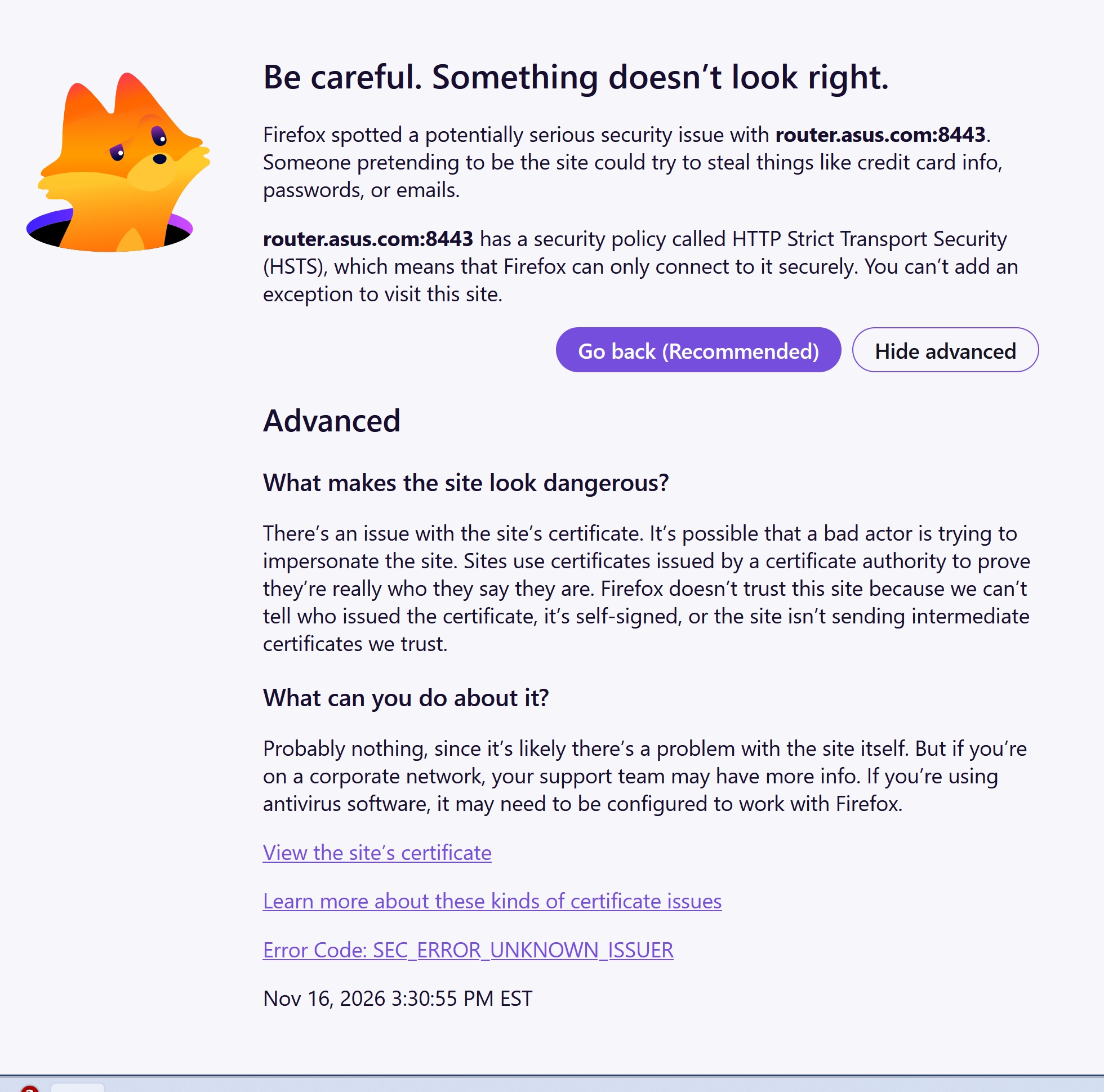
I just tried to connect to my local router using the web interface through Firefox 160.0. As always, it gave me a warning that the certificate did not look right. In the past, I could select Advanced, and then proceed anyway. However, in this new version, there is no option to proceed. How can I can get around this when I know it is OK to access a site?
ప్రత్యుత్తరాలన్నీ (8)
Because ASUS claims you're not allowed to do that (IOW they decide about their host there being used in the error message). You might need to ask Asus to help your with the correct host, if they no longer allow using one of theirs.
I don't understand your reply. I do have an Asus router. However, the block is coming from Firefox. I am accessing the router directly with Firefox to get to its settings. Because the router has a local certificate, Firefox marks it as suspect. In the past, there was an option to proceed anyway and take the risk. That option is no longer is offered by Firefox 160.0. Perhaps there is a setting where I can turn it back on, but I could not find one. Thanks.
No, there's not a setting for it, this choice comes from Asus.
You're somehow accessing your device using an Asus–owned domain, and they insist anything using this host needs to provide valid SSL/TLS encryption. (Note the "HSTS" in the error — en.wikipedia.org/wiki/HTTP_Strict_Transport_Security — this is something Asus requires for such address and there's no way around it.)
See zentalk.asus.com/t5/faq/wireless-router-error-message-hsts-appears-when-log-in-to-asus/ta-p/408813 demonstrating using the local IP address, not the Asus–owned hostname. (If they wanted to keep providing that to customers, they can't apply HSTS on that at the same time.)
The information you refer me to says that the server requires the browser to access it using a secure https connection. I am using a secure https connection. It is just that Firefox does not recognize the local certificate that the router uses for the https connection. I am not an expert on these things, so maybe I am missing something. But I was able to access this router a few days ago with Firefox with no problem, and I can access it now using Edge or Chrome. It seems to be something with the new Firefox, which I installed a couple of days ago.
Untrusted certs are fine. This is something else — you're apparently reaching a different machine (that responds with the HSTS) on that address, not your local router. Please use the device's IP address.
The host resolution for this domain is handled internally on your network as there's no valid entry for this: nslookup.io/domains/router.asus.com — so nobody can verify what's happening besides users connected on your network.
You can go to about:networking and check the "DNS" tab for details where this host is trying to point you, and compare that with other browsers, however that involves some networking essentials to evaluate. In the end you'd need to check why the response contains HSTS, and where it comes from. I'd personally just stick with the device's IP address and not rely on networking hacks that are not exactly kosher to start with, like the device trying to resolve somewhere i.e. relying on adding its own DNS information besides the data provided from upstream — albeit smart that's rather fragile.
Not sure what Asus recommends for your device otherwise. (Or whether this was caused by a firmware update of the router?)
If you want to rule out a Firefox update changing the behavior, you can try running mozilla.github.io/mozregression to help pinpoint a build whether this changed, if you're able to bisect to "good" vs "bad" builds using that tool as an experiment.
OK. If I type the IP address rather than router.asus.com with the proper port, Firefox still flags the page for a certificate issue, but it now gives me the option to proceed at my own risk.
Very strange. I was looking at the about:network dns. It showed routing to my router's IP address. Then I tried accessing through router.asus.com, and it worked this time. I am not sure what is going on. I have noticed before that, when I get the certificate error from Firefox when accessing, and I select to proceed at my risk, if I log in again fairly soon after, it will not give me the warning message. Perhaps it has something to do with Firefox caching that IP as OK for a period of time? I still think something has changed with Firefox 160.0, because I have been accessing my router for years without seeing this issue until now. The Asus help forum says to update the browser or try another browser, so apparently they think it is something that older browsers do or at least varies by browser.
I wouldn't over–rotate on this, as the FAQ seems to be bot–generated, and massively old judging from the screen shots. Every issue starts with updating and trying other browsers, devices, networks;)
Unfortunately instead of explaining how this cowboy DNS mapping of theirs is intended to work and why it'd end up with HSTS (which they acknowledge, but to me makes absolutely no sense how that happens "coincidentally"), they just silently skip over that reason — but that's the actual culprit.
(Yes, if they make a boo boo and respond with a wrong record for that host, pointing perhaps elsewhere than just this device of yours, that indeed might get cached. But just the ability to point elsewhere is super creepy so I'd avoid using this host shortcut/hack as much as possible — the encryption errors are not to nag users, they are genuinely meant to raise awareness when something apparently changes underneath them… and they can't see it easily.)