


Cannot connect Thunderbird to Spectrum

Aloha. I'm helping a friend with setting up a new Windows 11 PC, and cannot get Thunderbird to connect to Spectrum's servers. I spent an hour on the phone with Spectrum support and they just gave up and said it must be an issue with Thunderbird. Here are the details:
- Brand new Dell 24 All-in-One EC24250 - Windows 11 25H2 plus all additional fixes. - All Dell drivers updated. - Thunderbird V155.0 64-bit
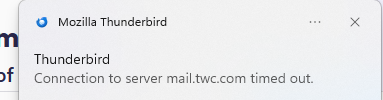
If I click on 'Get Messages' after a while I get: "Connection to server mail.twc.com timed out". I've gone into the config editor and changed mailnews.tcptimeout from 100 to 500 and still get the error.
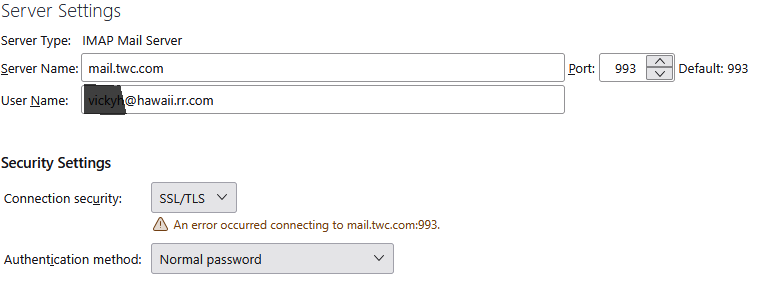
In the Account Settings | Server Settings | Test server connection I get: An error occurred connecting to mail.twc.com:993.
I've tried this with both setting up a brand new account in Thunderbird, and also via copying the 'Thunderbird' folder from %appdata%\roaming from her old machine.
Email configuration (from Spectrum).
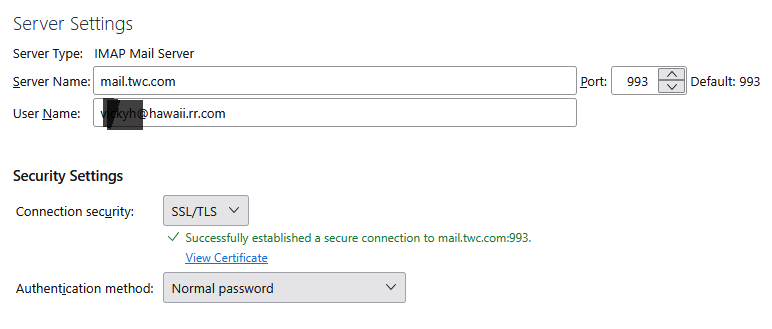
IMAP Settings Server name: mail.twc.com Port: 993 user name: abcd@hawaii.rr.com Connection Security: SSL/TLS Authentication method: Normal password
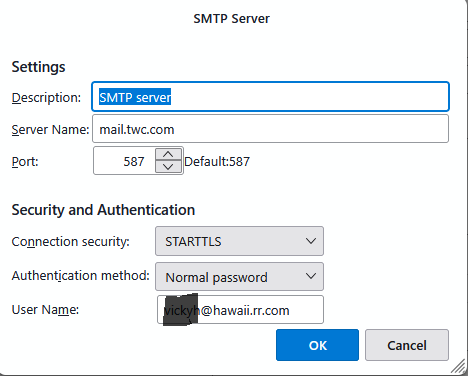
SMTP settings Server Name: mail.twc.com Port 587 Connection Security: STARTTLS Authentication method: Normal password
Can anyone help me troubleshoot this scenario?
Mahalo, Harry Z
ప్రత్యుత్తరాలన్నీ (7)
Forgot to add that I have verified the email address and password by logging into Spectrum's webmail interface.
I have also tried a fresh install of TB on a different computer. Tried both the automatic configuration and the one I received from Spectrum, neither one worked. HELP PLEASE!
It sounds like you are not actually connecting to the server. So first you need to see if there is anything that could be blocking the access.
Q: Did you get a download of Thunderbird from the official website : https://www.thunderbird.net/en-US/thunderbird/all/
or via 'Windows App Store' ?
This info would be useful to know as Windows App Store does not store the Thunderbird profile in the same place as Thunderbird if downloaded from website.
Firewall:
Do not disable Firewall as it may mean the default takes over and it's no use if it's disabled.
Firewall may be controlled by default installed with OS or it might be controlled by an Anti-Virus product you installed.
- Exit Thunderbird
- Access Firewall
- The Thunderbird program must be set up as an 'Allowed' program.
- Please confirm Thunderbird is set up as allowed program in the Firewall settings.
VPN
Please check computer for a VPN.
Many servers do not like a VPN because it hides your IP address and server may think you might be illegally trying to access account.
Many Anti-Virus products now come with a VPN and in some cases it gets auto enabled.
So please check and switch it off.
Anti-Virus: Q: What Anti-Virus are you using ?
If you have installed Avast or AVG - please disable the Mail Shield - it is notorious for causing problems with accessing emails.
I would also recommend you access the Anti-Virus and make an exemption to not scan anything in the 'Thunderbird' folder containing Profiles - this should also mean it would not scan anything within that folder. Imap accounts have files that are in a constant communication with server, opening files every time you download, send, select a folder or email etc etc and this can cause interruption to processes.
Server Settings: It looks like you are using the correct server settings for an imap account.
Can you please upload images that prove the settings you believe to be correct really are correct. I've had people say they are using certain settings but then discover an anomaly.
- 'Account Settings' > 'Server Settings' for the account.
- Post image showing all the right side.
- Obviously, obscure the first part of username = email address.
Also: In Thunderbird
- Help > Troubleshooting Information
- Scroll down to 'Mail and News Accounts' section
- Post image showing everything in that section.
- OR you could copy and paste it into this forum comment text box.
Check to see if there's conflicting data stored in the stored passwords.
- Settings > Privacy & Security
- Scroll down to Passwords section
- click on 'Saved Passwords'
- click on 'Show Passwords'
If a small Windows Security window pops up asking for a password or pin: When you start up computer, it asks you to type password to get into the User Account - that is the password you enter to be able to see stored passwords.
As this is a new Win11 computer, I'm not sure if you are signing in to a Microsoft Account or whether after creating one because you had no choice, you then created a proper computer User Account to use from then onwards so there is no confusion about what data is really stored on the computer and what data is a link to stuff stored automatically on a Microsoft Server.
Once you have access to the stored passwords, you should see only two lines for that spectrum account.
One line is incoming and starts with : imap://account the second is for outgoing and starts with smtp://account The 'User Name' = full email address
If you see more than just those 2 lines for that username eg: maybe two imap:// lines that start with Username, does one of them have an incorrect password and one a correct password ? Remove the one that has incorrect data, so you only have one incoming and one outgoing. Then do the following to edit the stored password - to force an update
- Right click on each line and select 'Edit Password'
- Completely clear all contents and then carefully type in the correct password.
Before you finish - is that User Name correct ? Does it show full correct email address ? If no:
- Right click on each line and select 'Edit User Name'
- Completely clear all contents and then carefully type in the correct full email address - no typos :)
- click on 'Close'
Now Exit Thunderbird - wait a few moments for background processes to update Start Thunderbird.
Aloha @Toad-Hall. Mahalo (thank you) for your responses.
Fresh install of TB downloaded from mozilla.
Antivirus / firewall - I'm using Windows Defender and Malwarebytes. I've turned off Malwarebytes and also added thunderbird.exe to the firewall. Same results
No VPN involved
No saved passwords (I'm assuming because I've never successfully logged on)
User name is correct
See the attached files for the screen shots you requested. Please note that the IMAP settings file shows a successful connection to the server (this is after clicking 'test server connection). This has only happened one time before in maybe 50 or 60 attempts. Also, there is a Connection Timed out file, this was maybe 20 seconds after the successful connection message was captured. The normal connection failure is also captured.
Again, mahalo (thank you) for your assistance. Harry Z
Also, just to make things more interesting, I tried using Outlook.
"Classic" Outlook cannot connect.
"New" Outlook connects with no problem. Unfortunately, there does not appear to be a way to get detailed connection settings from 'new' Outlook. :-(
Harry Z