


Update problems

Dear Firefox friends, I am rather computer illiterate and use the internet only for emails and purchasing from Amazon. I have avoided installing Firefox updates, as they disable my sound and change language to Albanian, where I live, but don’t speak Albanian. Can you solve this, or will I have to just avoid installing updates? I have no concern for security; anyone can hack into anything they want, but it will do them no good; I don’t have anything that is sensitive, and my bank has everything well secured (and minimal funds anyway). Do you have a permanent solution – I don’t want to fix every update? I know you hate non-nerds like me, but I'm 80, and have neither the time nor inclination to be one!!!! Thanks, and have a great day,
ప్రత్యుత్తరాలన్నీ (2)

"change language to Albanian, where I live,"
Two ideas, 1. Your Operating system is tied to Alabania
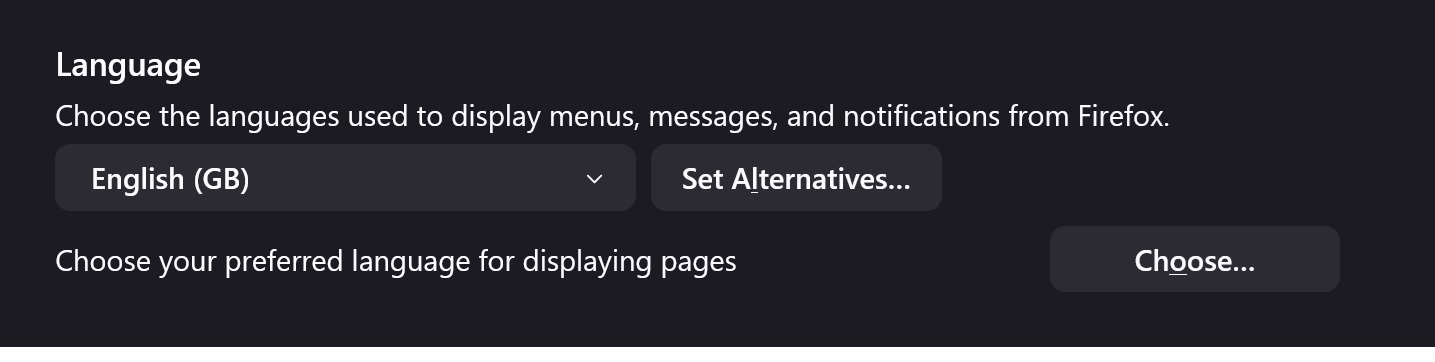
2. You can select the language you prefer under Settings > Language (that is for the toolbar and menus etc.
There is also a settings to select the language for the pages
See the attached image
Note that some websites insist in showing their pages in the local language if supported. In most cases they have a language selector that allows to change the language to English. You can consider to use a VPN to change the exit node to an English speaking country (the free Firefox VPN does not allow this).
See also: