


How do I select a specific calendar to unsubscribe?
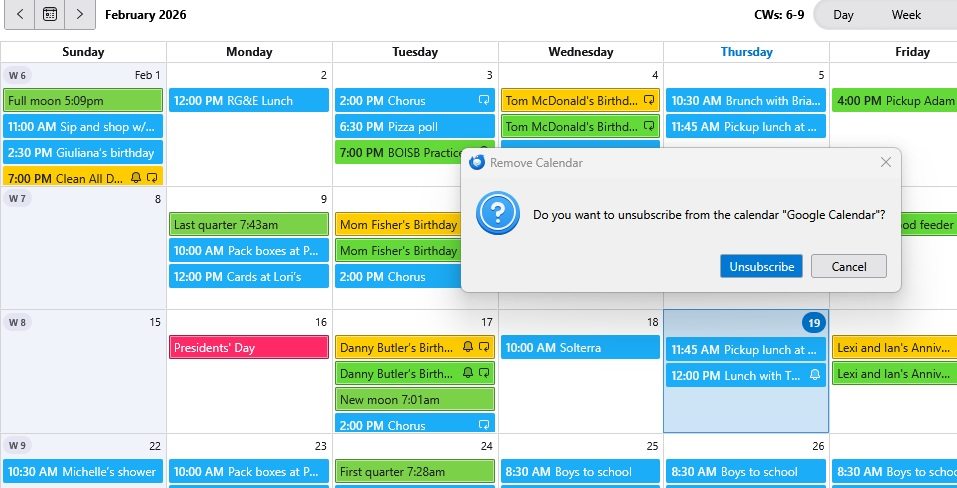
I have several different local calendars set up in my Thunderbird. I want to unsubscribe to a specific one. When I select "Unsubscribe from Selected Calendar" from the Events and Tasks drop down, the Calendar selected is not the one I want to subscribe from. How do I select the Calendar I want to unsubscribe from prior to selecting that menu option. I have searched through the forums and have found references to opening a Calendar tab and right clicking on the left pane to select a Calendar. When I right click on the Calendar tab, I just get the options to Open in New tab or close the current tab. I'm not understanding something and I'd appreciate any clarification on this step. I am including a screen shot that shows the Unsubscribe screen. The calendar that is selected is my Google calendar, but I don't want to unsubscribe from Google. I want to unsubscribe from a duplicate local calendar. How do I do that?
Thanks!
ప్రత్యుత్తరాలన్నీ (3)

You cannot unsubscribe from a local calendar, you'll have to delete it. Open a Calendar tab, right-click the calendar in the left pane - Delete Calendar.
Thank you for your reply. I understand that I have to delete a local calendar. My problem is that when I open a Calendar tab, I don't see a left pane. I just see one full pane of Calendar. When I right click on that pane, I get a drop down of options that are: New Event, New Task, Previous Month, Next Month,...Paste I appreciate your patience with me. I may not be understanding the concept of a pane in the Calendar display. Thanks again.
Sounds like the left pane is collapsed. Hover with the mouse over the left edge of the Calendar tab. When the mouse pointer changes to a double arrow, click and drag to the right so that the Calendar pane becomes visible again.