


After upgrading Thunderbird my e-mail archive is gone, could you help me restore it?

Hello people, I've just upgraded my Thinderbird because my inbox didn't load on opening the programme. I guess I have made a huge mistake somewhere in the process, because my whole archive has disappeared. I very much hope it still exists somewhere and that I will be able to restore it with your help. Thanking you in advance, Nele Ysebaert, Amsterdam
தீர்வு தேர்ந்தெடுக்கப்பட்டது
Thank you for the new screen shots. Indeed there are three profile folders in "Profiles, two of which have the same attribute "default". I think that the folder 044d7slj.default is the profile folder containing the data of your old profile, and that the two other profiles have been created recently.
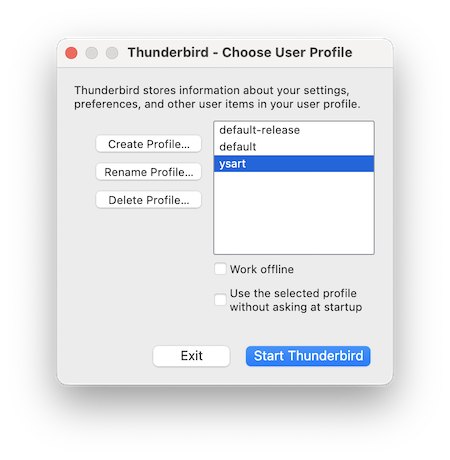
Now we are going to open the Thunderbird profile manager, create a new profile and connect it with your old "default" profile folder: • verify that Thunderbird is not running, press the keys Win + R >> a "Run" dialog will open • type: thunderbird -P in the dialog box and hit OK • the Thunderbird profile manager window will open, click "Create Profile..." which will open the "Create Profile Wizard", then click "Continue" • in the next window type a name for the new profile: instead of "Default User" choose ysart or nele for example (or another name you prefer) • then click the "Choose Folder..." button, navigate to the Profiles folder in ..\.neley\AppData\Roaming\Profiles\ , select folder 044d7slj.default, click "Open" and thereafter "Done" • the Create profile wizard closes and you'll be back in profile manager window (see image) in which your new profile "ysart" is displayed and selected. Click on "Start Thunderbird" and report what happens.
If you cannot follow the steps in my description have a look here https://support.mozilla.org/en-US/kb/profile-manager-create-and-remove-thunderbird-profiles#w_creating-a-profile
Mapenzi மூலமாக திருத்தப்பட்டது
All Replies (24)

Hello all,
I believe the latest version of Thunderbird has a major bug, at least on my Fedora Linux version. 153.0.2, which I installed yesterday, September 19, 2026.
I downgraded to version 148.0 and everything works fine. Upon dowgrading, I could verify that I had not lost any emails; everything was present on the email server to which my profile connects.
The problem I experienced (on all 3 of my systems) was that Thunderbird could no longer download messages. From the message in the status bar at the bottom of the window it appeared to be connecting to the mail server, but no messages would download.
I reported the problem via the dialog box that popped up, so I won't report the bug on bugzilla.mozilla.org; I'm sure they've had a flurry of activity already.
rhimb0h மூலமாக திருத்தப்பட்டது
I'll explain it to you.
The reason why I proceeded to upgrade my Thunderbird software in the first place, was that it had stopped loading the inbox folder.
When, after all your kind help, I finally saw back the original content of my Thunderbird, and just to be sure I quit and reopened the program, there it was again: the not-loading inbox folder.
I then noticed that its loading was blocked by the impossibility to retrieve information from this translators group's account - see the first of the last two screen shots I sent to you. In order to check whether this account was still working, I then wrote an e-mail message to myself from the group's address. I don't know how, but apparently this solved the problem.
ysart said
I then wrote an e-mail message to myself from the group's address. I don't know how, but apparently this solved the problem.
Thank you! Your picture with the empty main window frightened me and I was afraid that we were back to same problem as in the beginning. I didn't understand that the third account is now working without ranting. I still have no explanation why it didn't work on the first restart... Donc tout est bon dans le meilleur des mondes..... 🤝
Tout à fait (ayant vécu 2 ans à Nîmes, mon Français est mieux que mon Anglais - si on avait su!) et je vous remercie encore de m'avoir si bien aidé. Je vois que mes problèmes tenaient à un bug, alors ce n'était pas moi qui avais déconné finalement, mais en tout cas, il est évident que je n'aurais pas pu m'en sortir sans vous. Bravo, chapeau bas, et vous irez certainement au paradis!