


infinite download of 'Load up to 25 more'

I do all my email on my computer but I do have Tbird on my cellphone too, just in case I have to send something. But I never download. So I was in a situation where a government process included 'check your email' and I had only my cellphone with me. So I started downloading: 25 more, 25 more, 25 more ... and a hundred presses latter it's still not finished. Is there some way to reset that? I'm back with my computer and my email seem fine, but the cellphone remains stuck.

தீர்வு தேர்ந்தெடுக்கப்பட்டது
It seems the thing is that the phone has to grab the email before the computer gets it and deletes it from the server.
Yes, that makes sense. The account is likely configured on your computer to use the legacy pop protocol. Possibly also on your phone if you imported the same config.
Pop is designed for use on a single device. It typically downloads and stores the email locally on the device. Once downloaded, the email is typically deleted on the server. You can read more about pop v imap at the link below.
All Replies (13)
Is the cell phone running Thunderbird for Android?
Yeah, this is Android.
The "local folder size" setting controls how many messages are downloaded. The default value is 25 and can be increased. You can find this in settings > account name > fetching mail.
The app will display "load up to 25 more" at the bottom of a mailbox while additional messages are available on the server. I'd recommend only downloading x number of recent messages, rather than your full mailbox
Developers recommend not increasing the value beyond 500. The app is known to have performance and stability issues when increased beyond this value. See their comments linked below.
https://github.com/thunderbird/thunderbird-android/issues/10373
You can also set the age of messages to sync, for example, messages from the last 2 months. This can be helpful for people with very large mailbox's.
Navigate to settings > account name > fetching mail > sync messages from:
Thanks for the ideas. Tried all of that to no effect. 'sync from two days ago' and 500 messages, and it still keeps displaying the 'Load up to 500 more' no matter how many times I hit the button. I don't need anything in there, I'd happily just delete everything. Again, my computer version of Tbird is working fine.
What issue are you experiencing or objective your trying to achieve? Do you have an older email your trying to download to your phone. Have you tried using the search on server app feature?
The load more option will always be available at the bottom of the mailbox if you have more messages available on the server compared to those downloaded. There's no requirement to download more unless you need them on the phone.
Are you saying the app has downloaded all emails available in your inbox on the server and is still displaying the load 500 more option?
My inbox fails to show anything, all I get is that message. In practice I was trying to find a very recent email, but nothing shows until everything is downloaded (it seems). As I said, I never use my phone to read emails as a rule, this was exceptional. But I do use it on occasion to send which always works fine. I have hit the 'more' button so often that it must amount to thousands, so I'm quite sure there's nothing there, I just can't get it to stop showing that message.
... I just used my phone to send myself an email. It shows up on my computer in one second, but the phone itself just shows 'Load up to 500 more'.
Progress. Settings were incorrect but no message to that effect. I still can't sent a message to my phone, it goes to the computer. 'Load 500 more' was a waste of time since there was nothing there. Why not make the message say that?
Is there a 'get mail now' function on the phone?
Ray Andrews மூலமாக திருத்தப்பட்டது
Yes, a pull down on the message view or tapping sync all mail / sync account in the side menu initiates an immediate download of all new messages.
Have you granted the app permission to run in the background and excluded it from any battery optimisation via Androids settings.
Can you verify the incoming server settings are correct. Navigate to settings > account name > fetching mail > incoming server. Tap next. It will test the connection.
Have you checked that sync (or Push) in enabled on your Inbox. https://support.mozilla.org/en-US/kb/configure-push-email-thunderbird-android
Have you changed any settings that might have disabled sync such as Settings > general settings > network > background sync
Have you tried reinstalling the app, manually add the account and test with default settings applied. This would rule out any mis-configured settings.
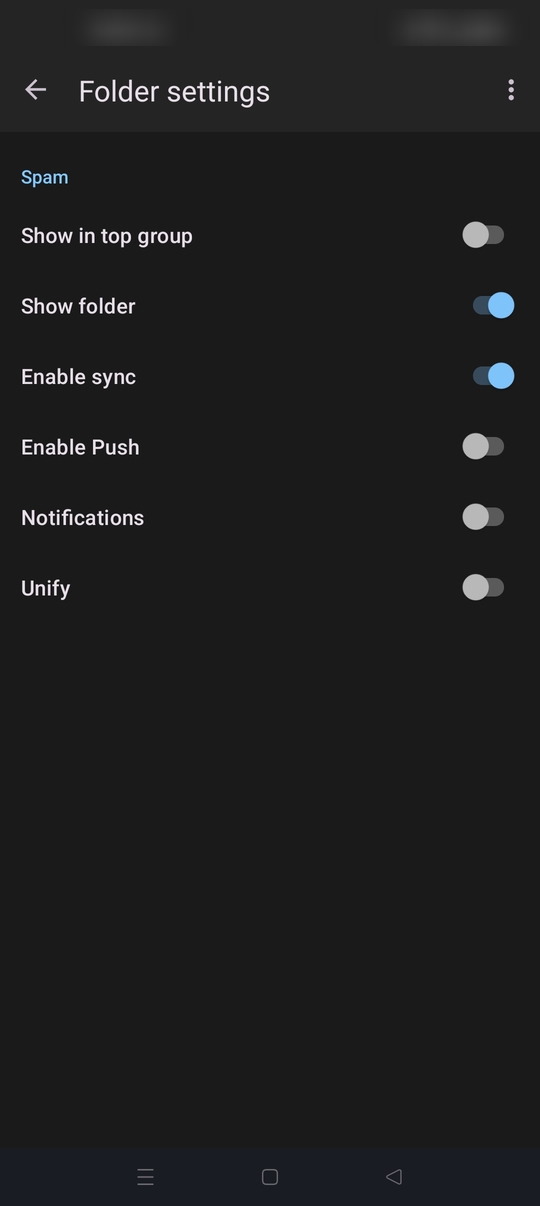
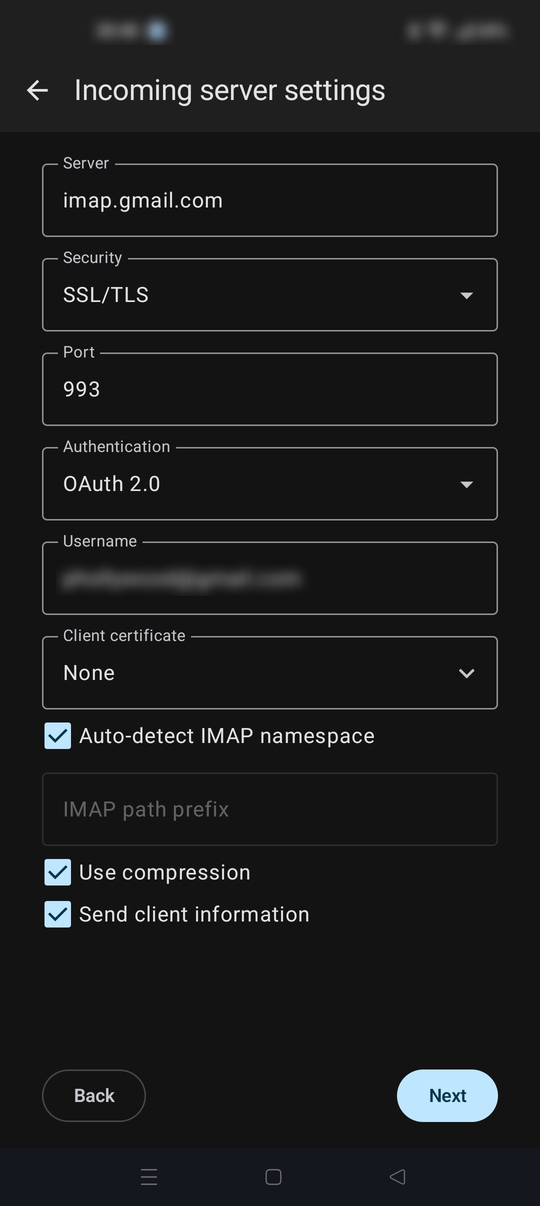
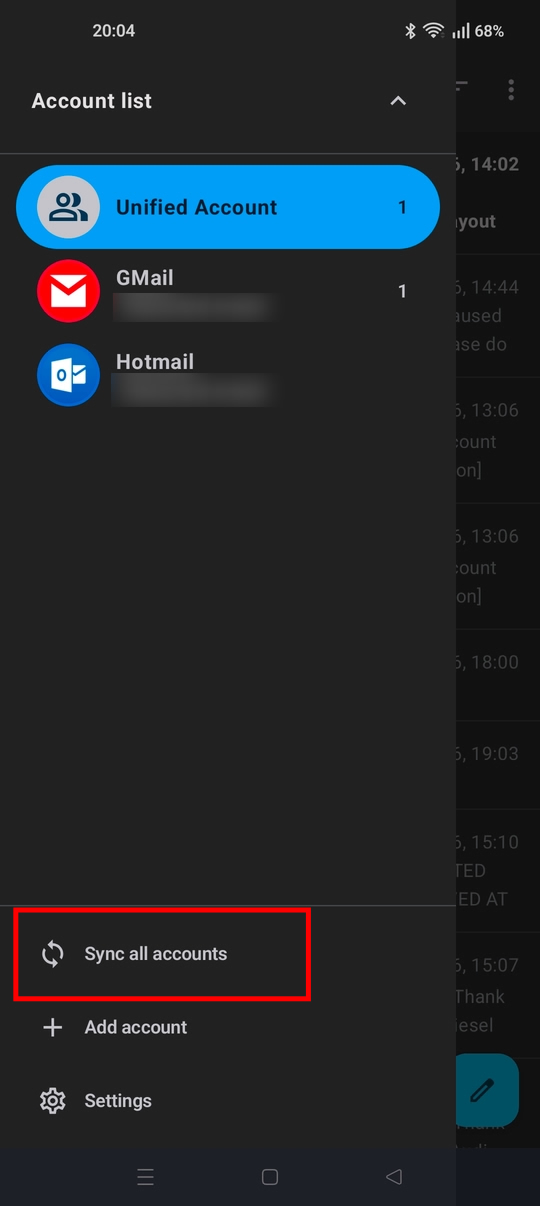
Platform34 மூலமாக திருத்தப்பட்டது
My side menu -- tx. BTW, I didn't even know that was there. That works. The rest will take some work, but I did manage to send myself something on the phone. BTW, I was way out in left field as to the '25 more' -- I don't know why that even shows at all, there was nothing in there. I had it in my head that my entire email history was waiting to download all over again, but this time to the phone. Silly!
It seems the thing is that the phone has to grab the email before the computer gets it and deletes it from the server.

Sounds like you overloaded the "fetch more" queue. Try, in order:
Give it 10-15 min on strong wifi — it may just be grinding through the backlog silently. Clear app cache: Android Settings → Apps → Thunderbird → Storage → Clear Cache (keeps your account, dumps the stuck sync). Force stop → reopen the app. Lower the sync limit: folder settings → "messages to keep synced" → smaller number (e.g. 25). Remove and re-add the account — since it's IMAP and your real email is untouched, this is zero-risk and guarantees a clean fetch.
Since you rarely use the phone for email anyway, I'd skip straight to clearing the cache, and if that doesn't work in a minute or two, just remove/re-add the account.
Zia Marketing மூலமாக திருத்தப்பட்டது
தீர்வு தேர்ந்தெடுக்கப்பட்டது
It seems the thing is that the phone has to grab the email before the computer gets it and deletes it from the server.
Yes, that makes sense. The account is likely configured on your computer to use the legacy pop protocol. Possibly also on your phone if you imported the same config.
Pop is designed for use on a single device. It typically downloads and stores the email locally on the device. Once downloaded, the email is typically deleted on the server. You can read more about pop v imap at the link below.
BTW, I had a response typed up, then I hit 'chosen solution' for yours above, and my own post evaporated :(
Yes, it's POP here. I'll ask my provider if I can change that.