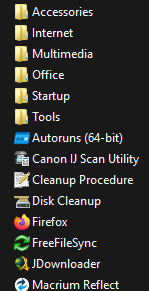
Forced Start Menu Icon with version 154.0

After updating Firefox to the latest version (154.0) a short while ago, Firefox now insists on adding a “Firefox” icon to my Start Menu every time I open it. I do not need or want this additional icon, as I already have all the Firefox icons I want in exactly the place(s) where I want them. I am not finding a toggle for this behavior anywhere in the Settings menu structure, although I might be overlooking it. Is there a way to stop this annoying behavior besides rolling back to version 153?
(I am running Windows 11 on a desktop PC with all updates installed, and Firefox is set as my default browser.)
All Replies (3)
If you are talking about the Windows task bar at the bottom of the screen this is a Windows feature, it list all the open programmes.
You mention the start menu which is different, could you show a screenshot.
Thanks
This has nothing to do with the taskbar, it is strictly the Start Menu where this is occurring.
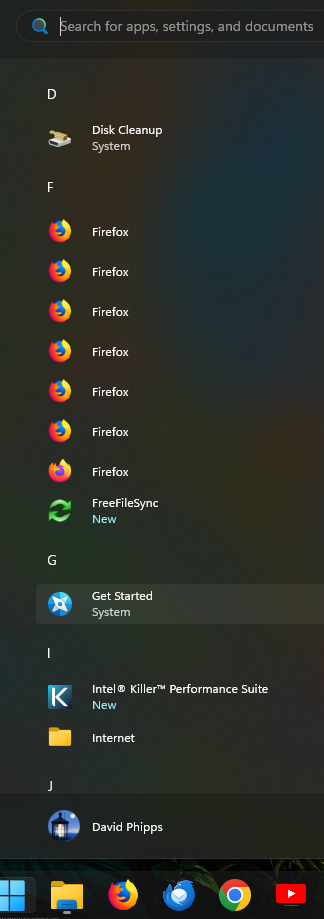
Oddly enough, in spite of Windows 11 displaying multiple copies of the Firefox shortcut, there is only one such shortcut in the actual Start Menu folder, as in the 2nd screenshot here. That one shortcut is what I am trying to stop Firefox from creating.