


Why is my firefox password manager being cleared periodically, without my permission?
This is NOT a new problem! I happened with my elderly computer and now with my new built computer. It is not a computer problem! It is a Firefox problem!
All Replies (5)
Could you given more detail. I use the same set up Win 11 ans Fx 153.03 and never had this problem nor on My Ubuntu or Raspberry Pi Debian, so not an Fx problem per ce, but likely a setup issue or a conflict with something else.
You say password manager do you have a master password or do you mean you keep loosing passwords and if the later does it happen after updates?
I don't have a master password beyond the one that opens my computer. Yes, actually, I just had a Firefox update, this morning, and that is when I noticed my password manager was empty. You also need to know you are chatting with a male, 74 yrs old who is barely computer literate. I am using Win11 Pro.
Hi. Male here nearly 79 :) but a bit of computer literacy.
Not idea of why this happens after an update, there are other post on this here, but I've never had it happen for over 20 year. I use Win 11 Home edition.
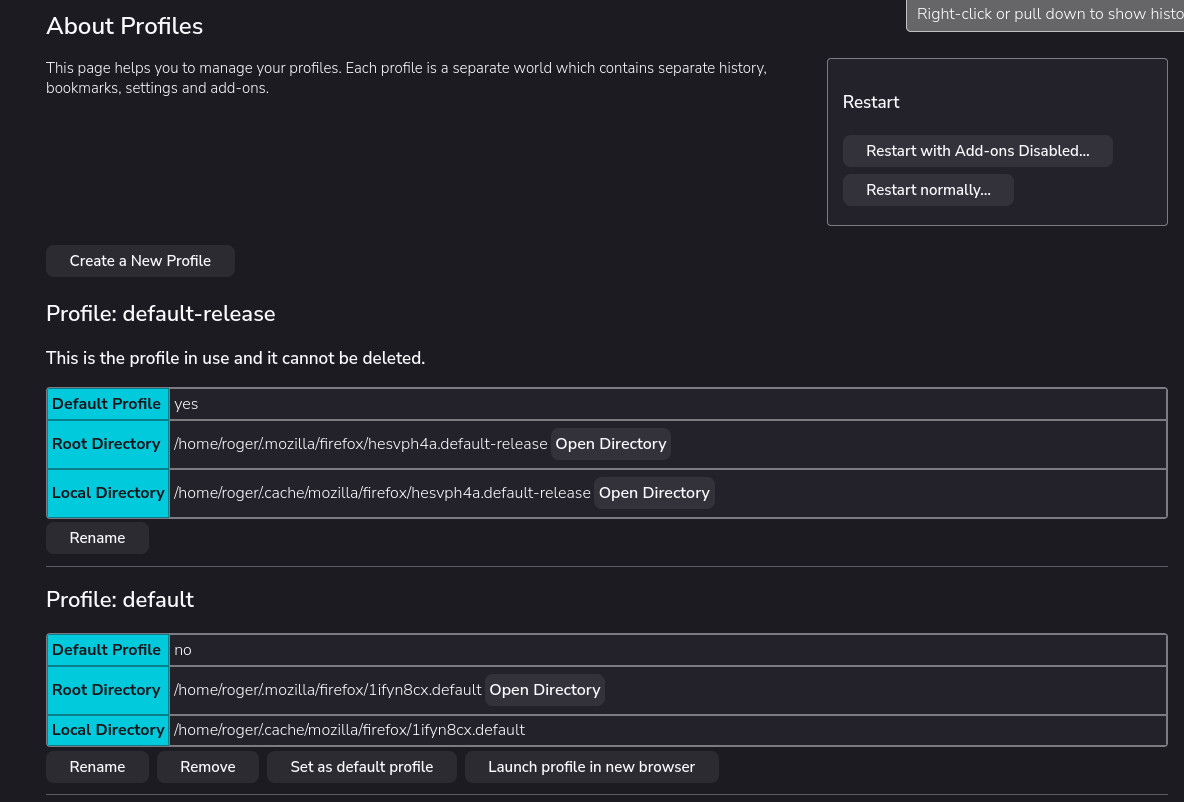
If you type 'about:profiles' in the URL/Address bar you can see where your profile is, this is where the passwords are kept.
Using the data of the path you can use Explorer to copy the whole profile for a a backup
You may see two or more profiles.
The current one is called [default-release]
You can also temporarily use an older profile, often called [default] and if that has your passwords make it permanent.
[Launch profile in new browser]
if all works you can [Set as default profile]
You may be 5 years older, but you are a great deal more computer literate than I am. I tried your "about profiles" approach and ended up in a rabbit hole, I had no way of dealing with. I have probably used Firefox for the last 20 years myself, and my problem did not start till this year. I ended up using Edge instead and I do NOT like the "Bing experience"!
Did you get to the page as in the image? and did you see two profiles:
Then did you use the option to [Launch profile in new browser]
That 'should' open another instance of Fx where you can check if you have passwords there.
amoun மூலமாக திருத்தப்பட்டது