


Windows 10 reached EOS (end of support) on October 14, 2025. If you are on Windows 10, see this article.

Search Support

Avoid support scams. We will never ask you to call or text a phone number or share personal information. Please report suspicious activity using the “Report Abuse” option.

Learn More
Open

Ballooning On Mac 12.7..6

Mapenzi replied
tightpurchaser

I have had Thunderbird from the time I acquired my Mac computer. This week it started to do something new. After a restart I opened Thunderbird. A box came up that says across the top System Integration. The cursor balloons, and hasn't stopped for the time I powered the computer, as least fifteen minutes. You know how the program icons are in a dock across the bottom. With other browsers open, hitting the Thunderbird icon doesn't bring its window into the forefront. This needs either a reset, or possibly a backup first. Is there a quicker way to fix this? Thanks in advance. I am not using a VPN; but I also have Thunderbird on my Windows 11. You might have seen a more recent thread on that installation. I included a screenshot. It was easier here to do that than on the Windows 11. On the Mac, I just had to use Activity Monitor to close out of Thunderbird in order to get its version.
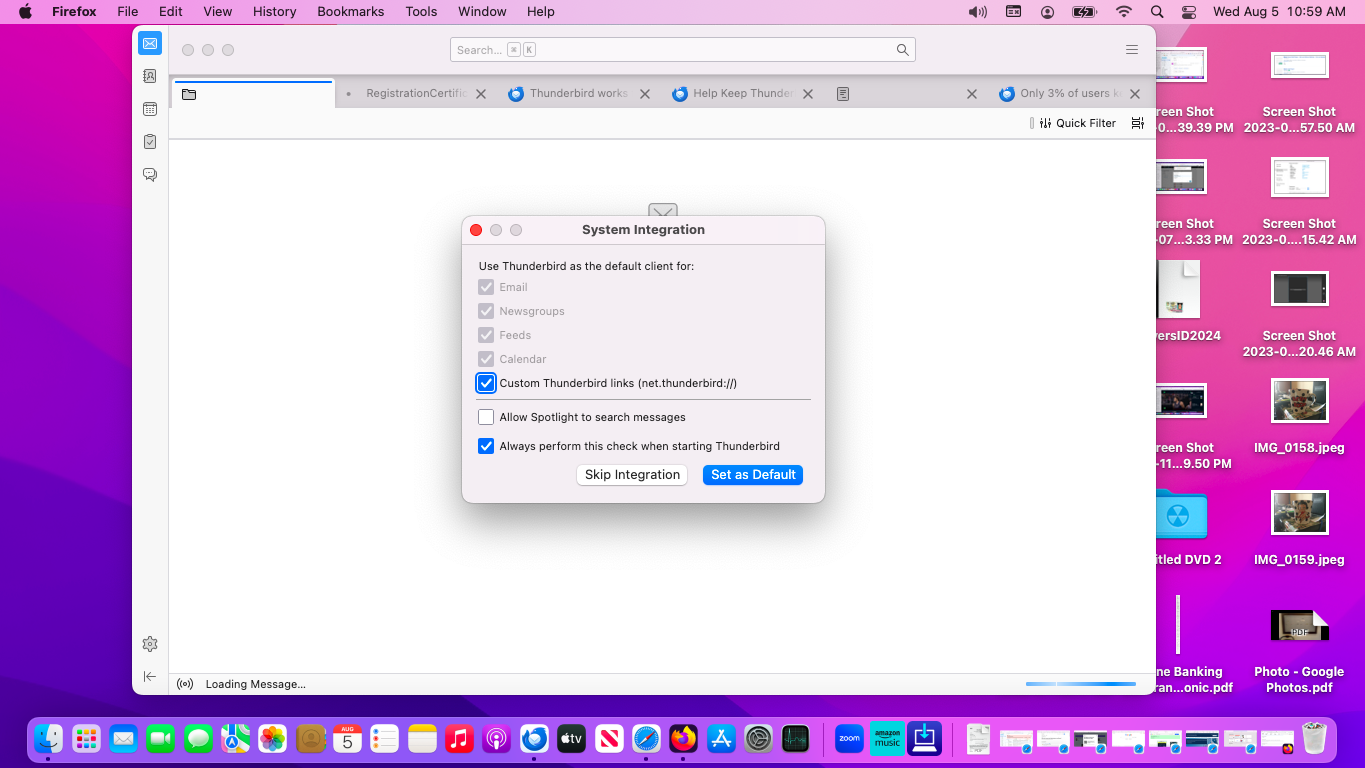
I have had Thunderbird from the time I acquired my Mac computer. This week it started to do something new. After a restart I opened Thunderbird. A box came up that says across the top System Integration. The cursor balloons, and hasn't stopped for the time I powered the computer, as least fifteen minutes. You know how the program icons are in a dock across the bottom. With other browsers open, hitting the Thunderbird icon doesn't bring its window into the forefront. This needs either a reset, or possibly a backup first. Is there a quicker way to fix this? Thanks in advance. I am not using a VPN; but I also have Thunderbird on my Windows 11. You might have seen a more recent thread on that installation. I included a screenshot. It was easier here to do that than on the Windows 11. On the Mac, I just had to use Activity Monitor to close out of Thunderbird in order to get its version.
Attached screenshots

All Replies (1)

Which version of Thunderbird are you using? If because of the turning beach ball it is impossible to find the version via the menu Thunderbird > About Thunderbird, open Application folder in Finder window, select Thunderbird.app and look up the version on the right pane. Now try to run Thunderbird in "troubleshoot mode': hold down the Alt (Option) key whilst launching Thunderbird...

கேள்வி எழுப்பு

You must log in to your account to reply to posts. Please start a new question, if you do not have an account yet.